The Impact of Streaming Platforms on TV Production and Distribution

Streaming platforms have revolutionized the television industry, transforming the way TV shows are produced, distributed, and consumed. With the rise of platforms like Netflix, Amazon Prime Video, Hulu, and Disney+, TV production and distribution have experienced a seismic shift. This article explores the profound impact of streaming platforms on TV production and distribution, examining the changes in content creation, audience behavior, industry dynamics, and the future of television in the digital era.

  1. Expanded Creative Opportunities:
    Streaming platforms have opened up new creative opportunities for TV production. With traditional broadcast networks, there were limitations on content due to censorship, time constraints, and adherence to advertising standards. However, streaming platforms offer creative freedom, allowing creators to explore diverse and boundary-pushing storytelling. This has led to the development of unique and innovative TV series that may not have found a home on traditional networks.
  2. Increased Production Budgets:
    Streaming platforms have significantly increased production budgets for TV shows. With the ability to reach global audiences, these platforms are willing to invest substantial sums in high-quality production values, top-tier talent, and cutting-edge visual effects. The increase in funding has led to visually stunning and cinematic TV series that rival big-budget films, attracting both established and emerging talent to the television medium.
  3. Binge-Watching and Changing Audience Behavior:
    The advent of streaming platforms has popularized binge-watching, where viewers consume multiple episodes or entire seasons in one sitting. This shift in audience behavior has influenced TV production and distribution strategies. Creators now design shows with addictive narratives, cliffhangers, and story arcs that encourage viewers to continue watching. Additionally, the release of entire seasons at once allows for serialized storytelling and the ability to create intricate, long-form narratives.
  4. Global Reach and Accessibility:
    Streaming platforms have enabled TV shows to reach a global audience instantly. Unlike traditional broadcasting, which relied on regional distribution and scheduling, streaming platforms have broken down geographical barriers. By making content available on-demand and across multiple devices, these platforms have made TV shows accessible to viewers worldwide, eliminating the need for international distribution deals and allowing for a more diverse and inclusive range of content.
  5. Disrupted Distribution Models:
    Streaming platforms have disrupted traditional distribution models in the television industry. Instead of relying on linear schedules and cable packages, audiences can now access a vast library of content through subscription-based services. This shift has led to cord-cutting, with viewers increasingly opting for streaming platforms over traditional cable or satellite TV. As a result, the power dynamics between networks, studios, and streaming platforms have shifted, with platforms often commissioning and distributing their own original content.
  6. Increased Competition and Market Fragmentation:
    The rise of streaming platforms has intensified competition in the TV industry. Traditional networks are now competing with streaming giants for audience attention and subscription dollars. As a result, there is a heightened demand for content, leading to increased production opportunities and a diversification of genres, formats, and storytelling styles. This market fragmentation has created a more competitive and dynamic landscape, offering viewers a wider range of choices and creating opportunities for niche programming.
  7. The Future of Television:
    Streaming platforms are shaping the future of television. As more viewers embrace on-demand, personalized viewing experiences, the traditional television model is evolving. Streaming platforms are investing in data analytics, artificial intelligence, and interactive technologies to enhance viewer engagement and tailor content recommendations. Additionally, the rise of original content produced by streaming platforms has led to a reimagining of TV storytelling, with shorter episode formats, limited series, and anthology formats gaining popularity.

Streaming platforms have had a profound impact on TV production and distribution, revolutionizing the industry in numerous ways. From expanded creative opportunities and increased production budgets to binge-watching, global accessibility, and disrupted distribution models, the influence of streaming platforms is undeniable. As the television landscape continues to evolve, streaming platforms will play a central role in shaping the future of content creation, audience behavior, and the overall direction of the television industry.

The Evolution of Sports Content Consumption in the Digital Era: A Golf-Focused Perspective

The digital era has revolutionized the way sports content is consumed, offering fans unprecedented access to their favorite sports and athletes. Golf, a sport known for its rich traditions and history, has also witnessed a significant shift in content consumption patterns. In this article, we will explore the evolution of sports content consumption in the digital era, with a specific focus on golf. From live streaming and social media engagement to personalized experiences and interactive platforms, we will delve into how technology has reshaped the way fans engage with golf and the implications for the sport.

  1. Rise of Live Streaming:

One of the most significant developments in sports content consumption is the rise of live streaming. Golf enthusiasts can now watch their favorite tournaments and events in real-time through dedicated streaming services, official websites, and mobile apps. Live streaming offers convenience and flexibility, allowing fans to tune in from anywhere in the world, on various devices. This shift has expanded the reach of golf, enabling a global audience to engage with the sport irrespective of geographical constraints.

  1. On-Demand Content and Highlights:

In addition to live streaming, on-demand content and highlights have become integral to the digital sports landscape. Fans can access curated highlights, recaps, and analysis of golf tournaments at their convenience. Platforms like YouTube and social media channels provide easily shareable and accessible bite-sized content, catering to fans who prefer concise updates or missed the live action. This evolution has empowered fans with greater control over what, when, and how they consume golf content.

  1. Social Media Engagement:

Social media platforms have emerged as powerful tools for engaging with sports content. Golf organizations, players, and broadcasters leverage platforms such as Twitter, Instagram, and Facebook to connect directly with fans, share behind-the-scenes insights, and provide real-time updates. Social media creates a sense of community among fans, enabling them to discuss, share opinions, and interact with fellow enthusiasts. This direct engagement enhances the fan experience, making them feel more connected to the sport and its athletes.

  1. Personalized Experiences:

Advancements in data analytics and AI have enabled personalized sports content experiences. Through user preferences, viewing history, and data-driven algorithms, platforms can recommend tailored golf content to fans. Personalization allows fans to discover new players, access exclusive interviews, and receive customized updates based on their interests. This level of personalization enhances fan loyalty and engagement, as fans feel the content is tailored to their specific preferences.

  1. Interactive and Immersive Experiences:

The digital era has also introduced interactive and immersive experiences in golf content consumption. Virtual Reality (VR) and Augmented Reality (AR) technologies provide fans with immersive experiences, allowing them to virtually walk the golf course, experience player perspectives, and explore course layouts. Additionally, interactive platforms enable fans to participate in virtual tournaments, predict outcomes, and engage in fantasy golf leagues. These interactive and immersive experiences provide a deeper level of engagement and entertainment, blurring the lines between fan and participant.

The digital era has transformed the way fans consume sports content, and golf is no exception. From live streaming and on-demand highlights to social media engagement and personalized experiences, technology has reshaped the fan experience. Golf enthusiasts now have unprecedented access, interactivity, and customization options at their fingertips, allowing them to engage with the sport on their terms. As technology continues to evolve, the future of sports content consumption in golf is likely to offer even more immersive, interactive, and personalized experiences, further deepening the connection between fans and the sport they love.

Exploring the Most Popular Golf Streaming Platforms

Golf has long been a beloved sport, captivating fans with its precision, strategy, and breathtaking courses. In recent years, the rise of live streaming platforms has made it easier than ever for golf enthusiasts to follow their favorite tournaments and players from the comfort of their homes. This article delves into some of the most popular golf streaming platforms, offering fans a comprehensive overview of where to catch the action and immerse themselves in the world of golf.

  1. PGA Tour Live:
    PGA Tour Live is the official streaming platform of the PGA Tour. It provides fans with extensive coverage of the tour, featuring live streams of select featured groups and featured holes during tournaments. Subscribers gain access to live golf action, exclusive player interviews, and on-demand content. PGA Tour Live offers a comprehensive golf experience, ensuring fans never miss a moment of the action.
  2. GolfTV:
    GolfTV is a global streaming service dedicated to golf. It offers a wide range of live coverage from various professional golf tours and events worldwide, including the PGA Tour, European Tour, and LPGA Tour. In addition to live tournaments, GolfTV provides fans with original programs, instructional videos, and exclusive player content. With its diverse offerings, GolfTV is a go-to platform for golf enthusiasts seeking comprehensive coverage and exclusive golf-related content.
  3. NBC Sports Gold:
    NBC Sports Gold is a subscription-based streaming service that includes a dedicated Golf Pass. The Golf Pass offers live and on-demand coverage of various golf tournaments, including the PGA Tour and European Tour events. Subscribers can enjoy featured groups, featured holes, and extensive coverage of major golf championships. NBC Sports Gold also provides additional content like instructional videos, documentaries, and exclusive interviews, making it a valuable resource for golf fans.
  4. ESPN+:
    ESPN+ is a popular sports streaming platform that includes coverage of various sports, including golf. While it may not offer as extensive golf-specific coverage as other platforms, ESPN+ provides access to select golf tournaments and events. Subscribers can enjoy live coverage, highlights, and on-demand content related to golf. ESPN+ offers a comprehensive sports package, making it a worthwhile option for fans who enjoy a variety of sports in addition to golf.
  5. YouTube TV:
    YouTube TV is a live TV streaming service that includes access to sports channels such as CBS Sports, NBC Sports, and Golf Channel. Subscribers can watch live golf tournaments and events broadcasted on these channels. YouTube TV also offers cloud DVR functionality, allowing fans to record and rewatch golf matches at their convenience. With its user-friendly interface and broad sports coverage, YouTube TV is a convenient choice for golf fans who prefer a comprehensive streaming service.

The availability of golf streaming platforms has revolutionized the way fans consume the sport. Whether it’s PGA Tour Live, GolfTV, NBC Sports Gold, ESPN+, or YouTube TV, each platform offers unique features and coverage to cater to the diverse needs of golf enthusiasts. With live streams, on-demand content, and exclusive programming, these platforms bring the excitement of golf directly to fans’ screens, ensuring they never miss a swing or a crucial tournament moment. So, grab your clubs and tune in to these popular golf streaming platforms to experience the thrill of the game from the comfort of your own home.

Low-Tech Streaming: A Cost-Effective Solution for Broadcasting

In today’s digital age, streaming has become an essential means of communication and entertainment. While most streaming services rely on expensive equipment and high-speed internet connections, there is an alternative route for those seeking a low-tech approach. This article will guide you through the step-by-step process of setting up a low-tech streaming business, including the necessary equipment, platforms, and cost-effective streaming options.

Step 1: Equipment Selection:
To embark on your low-tech streaming venture, you’ll need a few essential tools:

  1. Camera: Opt for an affordable yet reliable camera that can capture video in at least 720p resolution. Consider a webcam or a compact digital camera with video capabilities.
  2. Microphone: Ensure clear audio with a decent quality microphone. USB microphones are budget-friendly and provide satisfactory sound for streaming purposes.
  3. Lighting: Good lighting is crucial for a professional-looking stream. Utilize natural light or invest in inexpensive LED lights to enhance visibility.
  4. Tripod or Mounting Stand: Stabilize your camera with a tripod or a mounting stand to avoid shaky footage.

Step 2: Choose a Streaming Platform:
Selecting the right streaming platform is essential for broadcasting your content to a wide audience. Here are a few popular options:

  1. YouTube: YouTube offers a free platform for live streaming. You can create a channel and schedule live events to interact with your viewers.
  2. Facebook Live: Utilize your existing Facebook account to stream live videos. Facebook Live provides a user-friendly interface and allows for audience engagement.
  3. Twitch: Originally built for gamers, Twitch has expanded to accommodate various streaming genres. It offers free streaming options and a robust community of viewers.

Step 3: Internet Connection:
While low-tech streaming focuses on minimizing costs, having a stable internet connection is crucial. Ensure you have a reliable internet service provider that can support your streaming needs. A minimum upload speed of 5 Mbps is recommended for a decent quality stream.

Step 4: Pre-Streaming Setup:
Before going live, take care of the following tasks:

  1. Test your equipment: Ensure your camera, microphone, and lighting are properly set up and functioning well.
  2. Plan your content: Prepare an outline or script to keep your stream engaging and organized.
  3. Promote your stream: Use social media platforms and your personal network to create buzz and attract viewers to your upcoming stream.

Step 5: Going Live:
When it’s time to start streaming, follow these tips:

  1. Engage with your audience: Encourage viewers to leave comments and questions, and interact with them during the live stream.
  2. Maintain a consistent schedule: Regularly streaming at specific times can help build an audience and establish a loyal following.
  3. Experiment with content: Explore different topics, formats, and ideas to keep your streams fresh and captivating.

Low-tech streaming provides an affordable and accessible way to venture into the world of live broadcasting. By selecting the right equipment, choosing suitable streaming platforms, and ensuring a stable internet connection, you can successfully set up your low-tech streaming business. Remember to engage with your audience and consistently produce valuable content to attract and retain viewers. Embrace the power of low-tech streaming and make your mark in the digital realm without breaking the bank.

Mogrts What About Mogrts ?? What the #%€! Are They?

Exploring Mogrts: A Comprehensive Guide to Creation, Usage, and Naming Conventions

Mogrts, short for Motion Graphics Templates, have revolutionized the way multimedia content is created and utilized. These pre-designed, customizable templates streamline the process of creating visually stunning motion graphics, making them popular across various industries. In this article, we’ll delve into what Mogrts are, their applications, naming conventions, how to create them, and the process from start to finish.

What are Mogrts?
Mogrts are pre-designed motion graphics templates created using software like Adobe After Effects or Premiere Pro. They contain animated elements, such as text, shapes, transitions, and effects, that users can customize to fit their specific needs. Mogrts offer a time-efficient solution for creating professional-looking graphics without extensive design skills.

Usage and Applications:
Mogrts find applications in a wide range of scenarios, including:

  1. Video Productions: Mogrts enable video editors to easily add visually appealing graphics, lower-thirds, titles, and transitions to their videos.
  2. Social Media Content: Mogrts can be used to create eye-catching animations for social media platforms, enhancing brand presence and engagement.
  3. Presentations: Mogrts help create dynamic slide transitions and animated elements for presentations, making them more engaging and memorable.
  4. Broadcast Design: Mogrts are extensively used in TV broadcasts to incorporate dynamic graphics, lower-thirds, and overlays seamlessly.

Naming Conventions:
To maintain organization and facilitate easy retrieval, adhering to consistent naming conventions for Mogrts is crucial. Consider including relevant information in the file name, such as the template’s purpose, style, version, and resolution.

Creating Mogrts:
To create Mogrts, follow these steps:

  1. Design in Motion Graphics Software: Use motion graphics software like Adobe After Effects or Premiere Pro to design your animated elements. Ensure the composition is set up correctly, with all necessary layers organized and labeled.
  2. Essential Parameters: Identify the customizable parameters within your design that users may want to modify, such as text, colors, or timing. Make these parameters easily accessible for customization.
  3. Export as Mogrt: Export your composition as a Mogrt file, specifying the compatible software versions and any required plug-ins. Include a preview thumbnail and a brief description to provide users with an overview of the template.

The Process from Start to Finish:

  1. Conceptualize and Design: Brainstorm ideas and design your motion graphics template in motion graphics software.
  2. Customization Options: Identify and define the parameters that users can modify within the template to suit their specific needs.
  3. Export as Mogrt: Export the template as a Mogrt file, ensuring compatibility and including a preview thumbnail and description.
  4. Distribution and Usage: Share the Mogrt file with intended users through various platforms, such as online marketplaces, cloud storage, or direct distribution.
  5. Customization by Users: Users import the Mogrt file into their chosen editing software and customize the parameters to match their content.
  6. Integration into Projects: Users incorporate the customized Mogrt into their projects, leveraging its animated elements seamlessly.
  7. Iteration and Updates: Continuously refine and update your Mogrts based on user feedback, emerging trends, or new software capabilities.

Mogrts offer a convenient, time-saving solution for incorporating visually stunning motion graphics into various multimedia projects. By adhering to consistent naming conventions, creating customizable templates, and following a structured process, you can create and utilize Mogrts effectively, enhancing your creative workflows and producing captivating visual content.

Streamlining Workflow: How AI Enhancements Empower Editors in Adobe and Avid

In the fast-paced world of digital editing, efficiency is key. The integration of artificial intelligence (AI) has revolutionized the editing landscape, offering intelligent recommendations and automated features that streamline workflows. This article highlights how AI-based technologies, such as Adobe Sensei and Avid’s AI-driven features, empower editors to work more efficiently, make faster editing decisions, and meet tight deadlines with ease.

Automated Scene Detection with Adobe Sensei:
Adobe Sensei, the AI framework behind Adobe’s creative suite, brings forth a range of time-saving features designed to streamline the editing process. One such feature is automated scene detection. By analyzing cuts and transitions in footage, AI algorithms can identify and separate individual scenes automatically. This eliminates the need for manual scene identification, enabling editors to make faster editing decisions and focus on the creative aspects of their projects. With automated scene detection, editors can efficiently navigate through footage and accelerate the editing workflow.

AI-Driven Dialogue Detection in Avid:
Avid, a leading editing software, incorporates AI-driven features that enhance efficiency and simplify content location. Media Composer’s PhraseFind is a prime example of this. Powered by AI, it automatically detects dialogue within clips. This capability eliminates the need for manual transcription or time-consuming manual searching for specific dialogue. Editors can swiftly locate and extract the desired content, saving valuable time and effort. With AI-driven dialogue detection, Avid empowers editors to efficiently manage and access specific content, ensuring a seamless editing workflow.

Efficiency Boosts and Meeting Tight Deadlines:
The integration of AI into editing workflows brings significant efficiency boosts, helping editors meet tight deadlines without compromising on quality. AI-based technologies offer intelligent recommendations that can speed up the decision-making process. For instance, Adobe Sensei’s automated content analysis can suggest suitable edits, cuts, or effects based on the footage’s content. This assists editors in quickly making informed choices, reducing the time spent on manual evaluation and trial-and-error approaches.

Additionally, AI-driven features ensure efficient content organization, making it easier to locate and retrieve specific assets. Avid’s AI algorithms analyze and tag content, allowing editors to find relevant assets swiftly through MediaCentral | Editorial Management. By eliminating the laborious task of manually searching through vast media libraries, AI enhancements enable editors to work more productively and effectively.

The integration of AI-based technologies in editing software like Adobe Premiere and Avid has revolutionized the editing workflow. Through automated scene detection, Adobe Sensei empowers editors to make faster editing decisions by automatically identifying cuts and transitions in footage. Avid’s AI-driven features, such as PhraseFind, simplify content location by automatically detecting dialogue within clips. These AI enhancements not only streamline the editing process but also enable editors to work more efficiently and meet tight deadlines. By harnessing the power of AI, editors can maximize their productivity, focus on creativity, and deliver high-quality content in a timely manner.

Automating Tedious Tasks in Digital Editing: Unleashing Creativity with AI

Digital editing is a complex process that often involves repetitive and time-consuming tasks, which can impede the creative flow of editors. However, the integration of artificial intelligence (AI) technology has revolutionized the editing landscape, automating tedious tasks and allowing editors to focus more on their creative vision. This article explores how AI-powered tools, such as Adobe Premiere’s Auto Reframe and Avid’s PhraseFind and ScriptSync, streamline the editing process, saving time and effort while enhancing productivity and creativity.

Automated Resizing and Repositioning with Adobe Premiere’s Auto Reframe:
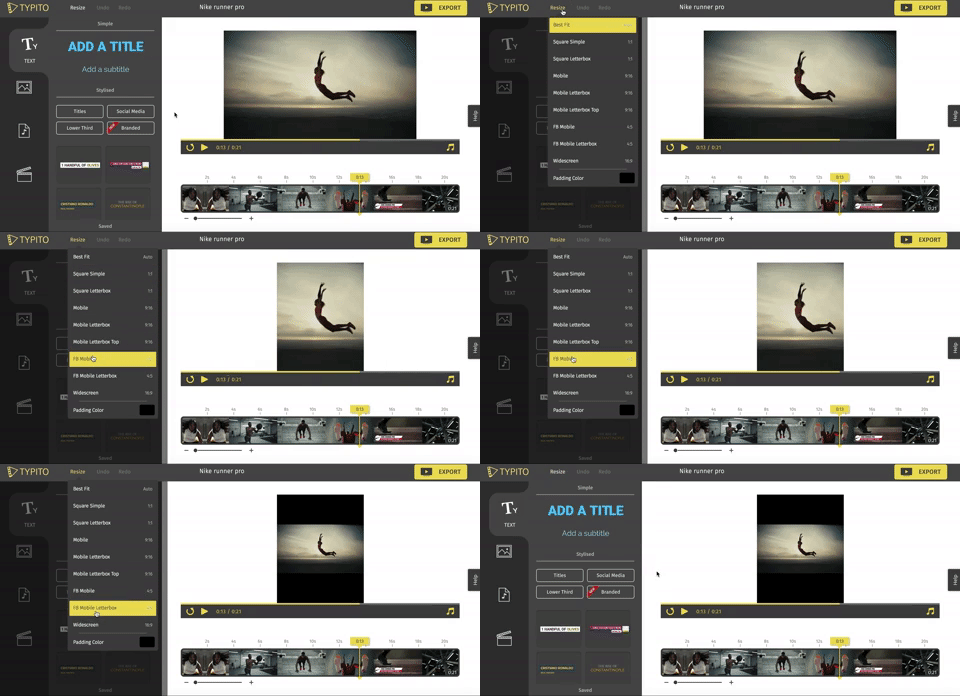
One of the most time-consuming tasks in digital editing is resizing and repositioning footage to fit various aspect ratios. Adobe Premiere’s AI-powered plugin, Auto Reframe, simplifies this process by automatically analyzing the content and intelligently reframing the footage. By leveraging AI algorithms, Auto Reframe can identify key elements within the frame and dynamically resize and reposition it to maintain visual focus. This automation saves hours of manual adjustment, allowing editors to allocate more time to creative decision-making and storytelling.

Streamlining Dialogue Search and Transcript Syncing with Avid’s AI-Based Tools:
Locating specific dialogue or syncing transcripts is another labor-intensive task in editing. Avid’s AI-based tools, such as PhraseFind and ScriptSync, provide efficient solutions to streamline these processes. PhraseFind utilizes AI algorithms to automatically detect dialogue within clips, eliminating the need for manual transcription or time-consuming manual searching. Editors can quickly search for specific dialogue or keywords, significantly reducing the time spent on content retrieval. Additionally, Avid’s ScriptSync automatically syncs transcripts with the corresponding footage, ensuring accurate alignment and simplifying the editing workflow. These AI-powered tools save valuable time and effort, enabling editors to focus on the creative aspects of their projects.

Enhancing Efficiency and Boosting Productivity:
By automating tedious tasks, AI-powered editing tools enhance efficiency and boost productivity. Editors can allocate more time and energy towards refining their creative vision, experimenting with different storytelling techniques, and achieving the desired visual impact. The automation of tasks like resizing, repositioning, and dialogue search allows professionals to work more efficiently, meeting tight deadlines without compromising on quality.

As AI technology continues to advance, the possibilities for automating tasks in digital editing are limitless, unlocking new avenues for creativity and productivity in the editing realm, ultimately revolutionizing the way professionals approach their craft.

Enhancing Video Content with Integrated Playout Graphics (IPGs)

In broadcasting and video environments, Integrated Playout Graphics (IPGs) play a vital role in enhancing the visual appeal and interactivity of video content. These systems enable real-time graphics rendering and the seamless insertion of dynamic graphics and text overlays into live or pre-recorded video. In this article, we will explore the various aspects of IPGs and how they contribute to a captivating viewing experience.

1. Real-Time Graphics Rendering:

IPGs offer real-time graphics rendering capabilities, allowing broadcasters and content creators to generate visually engaging graphics on the fly. Whether it’s lower thirds, logos, tickers, or full-screen graphics, IPGs enable the creation and insertion of these elements in real-time, enhancing the viewer’s experience. This real-time capability is particularly valuable for live broadcasts, as it enables instant updates and changes to graphics, ensuring accurate and up-to-date information is presented to the audience.

2. Dynamic and Interactive Elements:

IPGs empower content creators to add dynamic and interactive elements to their video content. These can include animated graphics, transitions, overlays, and interactive elements like polls, social media feeds, or live data updates. By incorporating these elements, IPGs make video content more engaging, immersive, and visually appealing. This interactivity encourages viewer participation and creates a more dynamic viewing experience.

3. Seamless Integration:

IPGs seamlessly integrate with existing video workflows, making them a valuable tool for broadcasters and content producers. They can be integrated with playout servers, video switchers, automation systems, and other broadcasting equipment, allowing for efficient and streamlined operations. This integration ensures that graphics and text overlays are inserted seamlessly into the video content, without any disruption or delay. Additionally, IPGs often support industry-standard protocols, making them compatible with various video formats and delivery platforms.

4. Customization and Branding:

IPGs offer extensive customization options, allowing broadcasters to align graphics with their brand identity. From choosing fonts, colors, and layouts to incorporating logos and visual elements, IPGs provide flexibility in creating graphics that reflect the brand’s aesthetics. This customization helps in maintaining a consistent visual identity across different video content and enhances brand recognition. Content creators can also create templates and presets for graphics, making it easier to generate graphics quickly and consistently.

Integrated Playout Graphics (IPGs) play a crucial role in enhancing video content by providing real-time graphics rendering and the seamless integration of dynamic and interactive elements. With their ability to customize graphics and ensure seamless integration, IPGs contribute to a captivating and visually appealing viewing experience. As technology continues to advance, IPGs will remain an essential tool for broadcasters and content creators in delivering engaging and immersive content.

Tips: Adding Graphics in Your Live-stream

Incorporating graphics into your livestream can greatly enhance its visual appeal and provide important information to your viewers. Here is a breakdown of the specific elements you can include and how to integrate them logically:

  1. Lower Thirds:
    Lower thirds are graphical overlays that appear at the lower portion of the screen, typically displaying names, titles, or additional information. To incorporate lower thirds logically:
  • Design: Create visually appealing lower thirds that align with your overall branding. Ensure legibility by using clear fonts, contrasting colors, and appropriate sizing.
  • Software: Use video editing software or dedicated livestreaming tools that offer lower third functionality. This allows you to overlay the graphics onto your livestream in real-time.
  • Timing: Introduce lower thirds when appropriate, such as when introducing guests, providing context, or displaying key information. Avoid cluttering the screen with too many lower thirds simultaneously.
  1. Title Graphics:
    Title graphics are static or animated visuals that introduce segments, topics, or themes within your livestream. Here’s how to incorporate them:
  • Design: Design visually appealing title graphics that reflect the theme or mood of your livestream. Use suitable fonts, colors, and imagery to capture attention.
  • Transitions: Introduce title graphics during transitions between segments or when starting a new topic. This helps bring a sense of structure and professionalism to your livestream.
  • Duration: Display title graphics long enough for viewers to read and understand them, but avoid keeping them on the screen for too long to maintain a smooth flow.
  1. Credits:
    Including credits in your livestream is a great way to acknowledge contributors, sponsors, or collaborators. Here’s how to incorporate them:
  • Design: Design a visually appealing credits sequence that aligns with your branding. Include names, logos, and any relevant information you want to highlight.
  • Placement: Place the credits sequence towards the end of your livestream, after you have finished the main content. This gives credit where it’s due and provides closure to your broadcast.
  • Duration: Display each credit for an appropriate amount of time, ensuring viewers have enough time to read and appreciate the information.
  1. Transitions:
    Transitions are visual effects used to smoothly switch between scenes, segments, or video inserts within your livestream. Here’s how to incorporate them:
  • Software: Use video editing software or dedicated livestreaming tools that offer a variety of transition effects. Examples include fades, dissolves, cuts, or wipes.
  • Style: Choose transition effects that match the tone and style of your livestream. For example, a sleek wipe or a subtle fade can create a professional and polished transition.
  • Timing: Implement transitions during natural breaks or when switching between different components of your livestream, such as changing topics, introducing video inserts, or transitioning to a different scene.

Remember, the key to incorporating graphics logically is to ensure they enhance the viewer experience without becoming overwhelming or distracting. Keep them visually appealing, relevant, and use them at appropriate times to maintain a cohesive and professional livestream.