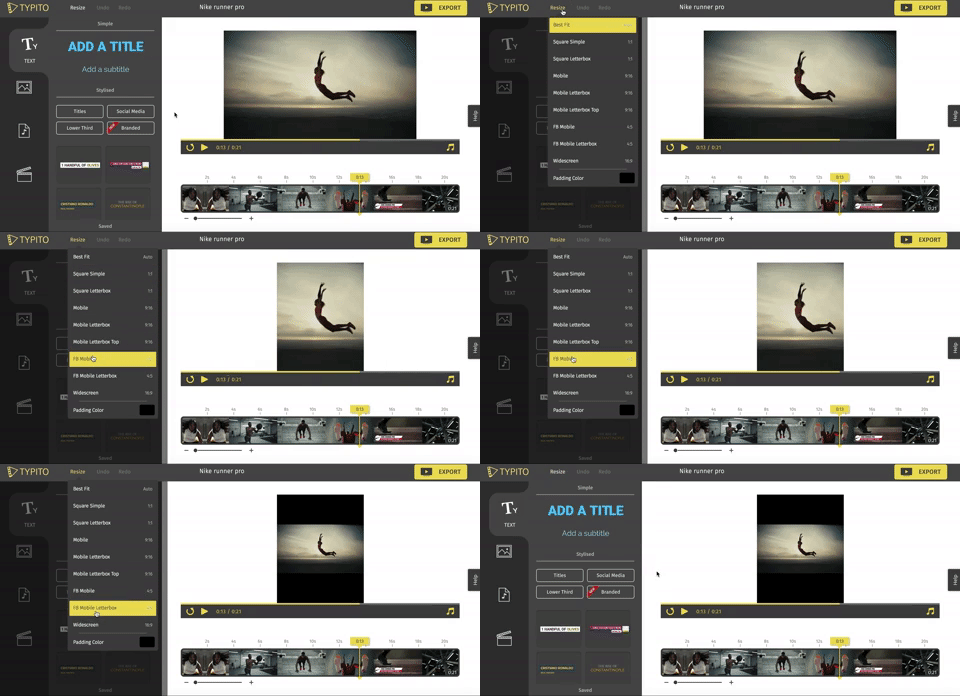
Mogrts What About Mogrts ?? What the #%€! Are They?

Exploring Mogrts: A Comprehensive Guide to Creation, Usage, and Naming Conventions

Mogrts, short for Motion Graphics Templates, have revolutionized the way multimedia content is created and utilized. These pre-designed, customizable templates streamline the process of creating visually stunning motion graphics, making them popular across various industries. In this article, we’ll delve into what Mogrts are, their applications, naming conventions, how to create them, and the process from start to finish.

What are Mogrts?
Mogrts are pre-designed motion graphics templates created using software like Adobe After Effects or Premiere Pro. They contain animated elements, such as text, shapes, transitions, and effects, that users can customize to fit their specific needs. Mogrts offer a time-efficient solution for creating professional-looking graphics without extensive design skills.

Usage and Applications:
Mogrts find applications in a wide range of scenarios, including:

  1. Video Productions: Mogrts enable video editors to easily add visually appealing graphics, lower-thirds, titles, and transitions to their videos.
  2. Social Media Content: Mogrts can be used to create eye-catching animations for social media platforms, enhancing brand presence and engagement.
  3. Presentations: Mogrts help create dynamic slide transitions and animated elements for presentations, making them more engaging and memorable.
  4. Broadcast Design: Mogrts are extensively used in TV broadcasts to incorporate dynamic graphics, lower-thirds, and overlays seamlessly.

Naming Conventions:
To maintain organization and facilitate easy retrieval, adhering to consistent naming conventions for Mogrts is crucial. Consider including relevant information in the file name, such as the template’s purpose, style, version, and resolution.

Creating Mogrts:
To create Mogrts, follow these steps:

  1. Design in Motion Graphics Software: Use motion graphics software like Adobe After Effects or Premiere Pro to design your animated elements. Ensure the composition is set up correctly, with all necessary layers organized and labeled.
  2. Essential Parameters: Identify the customizable parameters within your design that users may want to modify, such as text, colors, or timing. Make these parameters easily accessible for customization.
  3. Export as Mogrt: Export your composition as a Mogrt file, specifying the compatible software versions and any required plug-ins. Include a preview thumbnail and a brief description to provide users with an overview of the template.

The Process from Start to Finish:

  1. Conceptualize and Design: Brainstorm ideas and design your motion graphics template in motion graphics software.
  2. Customization Options: Identify and define the parameters that users can modify within the template to suit their specific needs.
  3. Export as Mogrt: Export the template as a Mogrt file, ensuring compatibility and including a preview thumbnail and description.
  4. Distribution and Usage: Share the Mogrt file with intended users through various platforms, such as online marketplaces, cloud storage, or direct distribution.
  5. Customization by Users: Users import the Mogrt file into their chosen editing software and customize the parameters to match their content.
  6. Integration into Projects: Users incorporate the customized Mogrt into their projects, leveraging its animated elements seamlessly.
  7. Iteration and Updates: Continuously refine and update your Mogrts based on user feedback, emerging trends, or new software capabilities.

Mogrts offer a convenient, time-saving solution for incorporating visually stunning motion graphics into various multimedia projects. By adhering to consistent naming conventions, creating customizable templates, and following a structured process, you can create and utilize Mogrts effectively, enhancing your creative workflows and producing captivating visual content.

Enhancing Your Livestream with Video Inserts and Vignettes: A Technical Guide

Incorporating video inserts or vignettes can add value to your livestream and provide hosts with a breather.  In thid technical guide, we will explore the steps to seamlessly integrate video inserts, discuss the benefits they offer, and provide tips for maximizing their impact on your livestream.

1. Planning and Pre-production:

a. Determine Purpose and Content: Identify the purpose of your video inserts. Are they meant to provide additional information, showcase sponsors, or simply give you a break? Define the content and style that aligns with your livestream’s theme and objectives.

b. Scripting and Storyboarding: Develop a script or outline for your video inserts to ensure a cohesive narrative. Storyboard key scenes or shots to visualize the flow and transitions.

2. Recording and Editing Video Inserts:

a. Equipment and Setup: Utilize a good quality camera, microphone, and appropriate lighting to capture professional-looking video inserts. Ensure consistency in audio and visual quality with your main livestream.

b. Filming Techniques: Use different angles, close-ups, or creative shots to make your video inserts visually engaging. Experiment with camera movements, framing, and composition to enhance the overall appeal.

c. Editing Software: Use video editing software such as Adobe Premiere Pro, Final Cut Pro, or iMovie to edit your video inserts. Trim unnecessary footage, add transitions, graphics, text overlays, and background music to enhance the production value.

3. Integration into Your Livestream:

a. Timing and Transitions: Determine the ideal moments to insert your videos. Consider using transitions like fades, dissolves, or cuts to smoothly transition between your livestream and the video inserts.

b. Livestream Overlay: Customize an overlay or lower third graphic that includes your branding, title, or key information to maintain consistency across your livestream and video inserts.

c. Streaming Software or Hardware: Use streaming software like OBS Studio or vMix to incorporate your video inserts seamlessly. Set up scene transitions or media sources to switch between your livestream and video inserts effortlessly.

4. Adding Value and Breather:

a. Educational or Informative Content: Include video inserts that provide valuable information, tips, or insights related to your livestream’s topic. This adds educational value to your stream and gives you a break from live hosting.

b. Sponsored or Promotional Content: If you have sponsors or partners, consider incorporating video inserts that highlight their products, services, or messages. This adds value to your sponsors and allows you to take a breather while maintaining engagement.

c. Entertainment or Intermission: Insert entertaining video clips, interviews, or behind-the-scenes footage during breaks or intermissions to engage your audience and provide yourself with a brief respite.

5. Testing and Rehearsing:

a. Technical Checks: Before going live, test the integration of your video inserts with your streaming software to ensure a smooth transition. Check audio levels, video quality, and timing to avoid any technical glitches.

b. Rehearsals and Timing: Practice your transitions and timing during rehearsals to ensure that your video inserts align seamlessly with the flow of your livestream. This will help you maintain control and ensure a polished final production.

By incorporating video inserts or vignettes into your livestream, you can add value, enhance engagement, and give yourself a breather while maintaining a professional and engaging production. Thorough planning, quality recording and editing, seamless integration, and valuable content are key components to successfully incorporating video inserts into your livestream. With practice and experimentation, you can create an immersive and captivating livestream experience for your audience.

Mastering the Run of Show: A Live-streaming Guide

When it comes to executing a successful livestream, having a well-structured plan is crucial. One effective way to achieve this is by creating a run of show. In this article, we will explore the art of creating a run of show and provide examples for a livestream on creating a livestream.

Understanding the Run of Show:

A run of show is a detailed timeline that outlines the sequence of events, segments, and key elements of a livestream. It serves as a blueprint for the entire production, helping you stay organized and ensuring a seamless and engaging livestream experience for your audience.

Creating a Run of Show for a Livestream on Creating a Livestream:

1. Pre-Show Preparation (15 minutes):

   – Set up the livestreaming equipment and test audio/video quality.

   – Do a run-through of the content and ensure all necessary materials are ready.

   – Conduct a final technical check before going live.

2. Introduction and Overview (10 minutes):

   – Start the livestream with a warm welcome and introduce yourself.

   – Provide a brief overview of what the livestream will cover.

   – Share the objectives and goals of the livestream.

3. Livestreaming Basics (20 minutes):

   – Explain the fundamentals of livestreaming, including platforms and equipment.

   – Discuss the importance of engaging content and building an audience.

   – Share tips for creating a compelling livestreaming experience.

4. Equipment and Setup (15 minutes):

   – Demonstrate and explain the necessary equipment for livestreaming.

   – Detail the step-by-step process of setting up a livestreaming setup.

   – Offer recommendations for optimizing audio, video quality, and lighting.

5. Interactivity and Audience Engagement (15 minutes):

   – Discuss methods to interact with viewers, such as chats, polls, and Q&A sessions.

   – Share strategies for fostering engagement and building a community.

   – Highlight the importance of audience participation in livestreaming success.

6. Troubleshooting and Best Practices (15 minutes):

   – Address common technical issues and provide troubleshooting solutions.

   – Share best practices for handling challenges during a livestream.

   – Offer tips for maintaining professionalism and adapting to unexpected situations.

7. Q&A Session (10 minutes):

   – Allocate time for viewers to ask questions related to livestreaming.

   – Answer selected questions and provide insightful responses.

8. Conclusion and Call to Action (5 minutes):

   – Recap the key points covered during the livestream.

   – Thank the viewers for their time and participation.

   – Encourage viewers to subscribe or follow for future livestreams and additional content.

A well-executed run of show is essential for delivering a smooth and engaging livestream experience. By following a detailed plan like the example provided above, you can ensure that your livestream on creating a livestream is organized, informative, and captivating for your audience. Remember, a well-prepared run of show sets the stage for a successful live-streaming production.

The Art of Creating a Rundown: A Livestreaming Guide

Live-streaming is an incredibly popular medium for sharing content and engaging with audiences in real-time. However, without a well-structured plan, it can be challenging to keep your live-stream on track and maintain viewer interest. One effective way to ensure a smooth and engaging live-stream is by creating a rundown. In this article, we will explore the art of creating a rundown and provide examples for a livestream on creating a livestream itself.

What is a Rundown?

A rundown is a detailed outline or script that serves as a roadmap for your live-stream. It helps you organize your content, transitions, and timing, ensuring a cohesive and professional presentation. A well-crafted rundown provides a clear structure, prevents confusion, and allows you to stay on track throughout your live-stream.

Creating a Rundown for a Live-stream on “Creating a Live-stream”:

1. Introduction (5 minutes- times given are for example purposes only):

   – Welcome viewers and introduce yourself.

   – Briefly explain the purpose of the livestream.

   – Outline the topics you will cover.

2. Understanding Live-streaming (10 minutes):

   – Define live-streaming and its benefits.

   – Discuss popular live-streaming platforms.

   – Highlight key technical requirements for a successful livestream.

3. Equipment and Setup (15 minutes):

   – Explain the essential equipment for livestreaming.

   – Demonstrate how to set up a basic livestreaming setup.

   – Provide tips and recommendations for optimizing audio and video quality.

4. Engaging Your Audience (10 minutes):

   – Discuss strategies for attracting and retaining viewers.

   – Explore interactive features like chat, polls, and Q&A sessions.

   – Share tips on fostering audience engagement and building a community.

5. Troubleshooting and Best Practices (10 minutes):

   – Address common technical issues and their solutions.

   – Offer best practices for handling unforeseen challenges during a livestream.

   – Provide tips for creating backup plans and maintaining professionalism.

6. Q&A Session (10 minutes):

   – Allocate time for viewers to ask questions.

   – Answer selected questions related to livestreaming.

7. Conclusion (5 minutes):

   – Recap the main points covered in the livestream.

   – Thank viewers for their time and participation.

   – Encourage them to subscribe or follow for future livestreams.

Creating a rundown for your livestream is an essential step in delivering a structured and engaging experience to your audience. By following a well-organized plan like the example provided above, you can ensure that your livestream is informative, engaging, and enjoyable for viewers. Remember, a well-prepared rundown sets the foundation for a successful live-streaming experience.

Tips: The Role of Consistency in Live Streaming

Consistency is the backbone of successful live streaming. Maintaining a regular and predictable schedule, content format, and overall experience is essential for building a loyal audience and maximizing the impact of live streaming efforts. In this article, we will explore the reasons why consistency is paramount in the world of live streaming.

  1. Establishing Trust and Loyalty:
    Consistency breeds trust. When viewers know what to expect from a live streamer, they feel more comfortable investing their time and attention. By consistently delivering high-quality content at scheduled times, streamers build a loyal fan base that eagerly anticipates their streams, knowing they won’t be disappointed.
  2. Setting Expectations: Consistency helps set clear expectations for viewers. By maintaining a consistent format, such as a particular theme or style, streamers provide a sense of familiarity and coherence. This allows viewers to understand what they will gain from each stream, enabling them to make informed decisions about whether to tune in regularly.
  3. Increasing Discoverability:
    Consistent live streaming improves discoverability. When streamers adhere to a regular schedule, viewers know exactly when and where to find them. This predictability helps attract new viewers, as they can rely on a consistent streaming presence. Discoverability is crucial for growing an audience and expanding reach across streaming platforms.
  4. Enhancing Branding and Identity: Consistency strengthens a streamer’s brand and identity. By maintaining a consistent visual style, tone, and overall experience, streamers establish a recognizable and memorable presence. This consistency solidifies their brand identity in the minds of viewers, making them stand out in a saturated streaming landscape.
  5. Improving Production Quality: Consistency allows streamers to refine their production quality over time. By consistently streaming, they gain valuable experience and learn what works best for their audience. This enables them to make incremental improvements, enhancing the overall quality of their streams and delivering a more polished and professional experience.
  6. Fostering Engagement and Interaction: Consistency encourages audience engagement and interaction. When viewers know a streamer will be live at a specific time, they can plan to participate, share feedback, and interact with the streamer and fellow viewers. Regular streams create a sense of community, where viewers can connect and engage with like-minded individuals.
  7. Building Long-term Growth: Consistency is a long-term strategy for growth. By consistently delivering valuable content, streamers foster a dedicated following that is more likely to share their streams, recommend them to others, and contribute to their growth. Over time, this organic growth can lead to increased viewership and opportunities for monetization.

Consistency is the cornerstone of success in live streaming. It builds trust, sets expectations, enhances branding, improves production quality, fosters engagement, and fuels long-term growth. By recognizing the importance of consistency and implementing it in their streaming efforts, content creators can forge lasting connections with their audience and thrive in the dynamic world of live streaming.

Cisco 4D Replay & Top Tracer Technology in Sports – A 360 View

The Cisco 4D Replay technology premiered at the 2015 NBA All-Star Weekend, which was held in New York City. It was used to capture and provide 360-degree replays of the All-Star Game, allowing viewers to experience the game from a new and immersive perspective. The technology was developed in collaboration with Replay Technologies, which was later acquired by Intel. Since its debut, the Cisco 4D Replay technology has been used in a variety of sporting events, including the US Open Golf Tournament, NFL games, and the NBA Finals.

At the 2019 US Open Golf Tournament, Cisco 4D Replay was introduced to capture and provide 360-degree replays of live events. The technology utilized 80 cameras that were placed around the course, including on towers and cranes, to capture multiple angles of each shot. The footage was then processed through a system that created a 360-degree view of the shot, which could be viewed from any angle.

Cisco and the USGA went deeper, and brought 4DReplay to the tee box of golf courses, which allows golfers and fans to view a player’s swing at 360 degrees. With 88 cameras set up in a ring around the tee box, the video captures enough footage that it can be paused at 34 different points in the motion. Not only could broadcasts show the technology they added to their analysis of players’ swings, and fans could watch the clips on demand through the USGA app.

The process of creating a 360-degree view from multiple camera angles involves stitching together the footage from each camera into a single panoramic view. There are various types of software that can be used to accomplish this, including specialized 360-degree video editing software such as Kolor Autopano Video or VideoStitch Studio, and even mainstream video editing software such as Adobe Premiere Pro or Final Cut Pro can be used to achieve this effect. Additionally, there are companies that offer specialized services for creating panoramic views from multiple camera angles, such as Pixvana SPIN Studio and Mistika VR. However, it’s worth noting that without more specific information about the technology used in the Cisco 4D Replay system, it’s difficult to say which specific software or systems were used to process the footage.

This innovative technology allows viewers to experience the tournaments in a unique way, providing a level of detail and perspective that was not previously possible. The 4D replays are shown on television broadcasts and are also available for viewers to watch online.

The use of Cisco 4D Replay at the US Open Golf Tournament provides an exciting way for viewers to engage with the event and gain a deeper understanding of the game. The technology allows for a more immersive viewing experience that brings the action closer to fans and provides a level of detail and perspective that was not previously possible.

Overall, the use of Cisco 4D Replay at the US Open Golf Tournament has demonstrated the potential of innovative technologies to enhance the viewing experience for fans and provide new opportunities for engagement with live events. As technology continues to evolve, it is likely that we will see even more exciting and innovative ways to experience live events in the future.

Toptracer is a technology used in golf broadcasting to track the flight of the ball in real-time. It works by using CMOS (Complementary Metal-Oxide-Semiconductor) image sensors to capture images of the golf ball in flight from multiple camera angles. These images are then fed into a computer system that analyzes them to calculate the ball’s trajectory and projected landing point.

Unlike traditional cameras, which use light to capture images on a negative film, CMOS image sensors convert light into electrical signals that can be processed by a computer. This allows Toptracer to capture and analyze multiple angles of the ball’s flight path, providing accurate data on its speed, spin, and trajectory.

Overall, Toptracer technology provides a more engaging viewing experience for golf fans by allowing them to see the flight of the ball in real-time and providing detailed data on each shot. It also provides valuable information for golfers and coaches to analyze their performance and make improvements to their game.

The World According to Golf

Golf is much more than just a sport. It is a way of life, a culture, and a philosophy that has shaped the world in many different ways. The world according to golf is a world of tradition, etiquette, and respect. Golfers are expected to follow a strict code of conduct that includes showing respect for the course, the other players, and the game itself. This code of conduct is known as the “etiquette” of golf, and it is one of the defining characteristics of the sport.

Yet, golf is not just about tradition; it is also about innovation and technology. In recent years, golf equipment has become more advanced than ever before, with clubs, balls, and other gear designed to help golfers improve their game. Players can use technology to analyze their swing, track their progress, and even simulate different golf courses on a computer.

The world of golf is also a world of competition. Golfers compete in tournaments and events all over the world, with millions of dollars in prize money at stake. Some of the most famous golfers in history, such as Tiger Woods, Jack Nicklaus, Arnold Palmer, Ben Hogan, Bobby Jones. And, of course let’s not forget some of the legendary women such as Annika Sorenstam, Babe Zaharias, Mickey Wright, Patty Berg, and Nancy Lopez. All are revered as legends of the sport.

But golf is not just about competition; it is also about community. Golf clubs and courses are places where people can come together, socialize, and enjoy the outdoors. Golfers often form close bonds with each other, and many golf clubs have a strong sense of camaraderie and tradition.

Finally, the world according to golf is a world of beauty. Golf courses are often situated in some of the most stunning locations in the world, with rolling hills, lush green fairways, and breathtaking views. For many golfers, playing a round of golf is not just about the game itself, but also about enjoying the natural beauty of the course.

The world according to golf is a complex and multifaceted world that encompasses tradition, innovation, competition, community, and beauty. Golf is much more than just a sport; it is a way of life that has influenced the world in many different ways. Whether you are a seasoned golfer or a beginner, there is something in the world of golf for everyone to enjoy.

Golf Broadcasting & Streaming: Cloud Link, Shot link, Trackman, AI

The world of professional golf broadcasting has been transformed by cloud linking technology in recent years. This technology allows broadcasters to manage and distribute content over the internet, leveraging the scalability and flexibility of cloud computing to reach a global audience.

One of the most significant benefits of cloud linking in golf broadcasting is the ability to live stream tournaments to a global audience. Rather than relying on traditional broadcasting methods that require expensive equipment and infrastructure, cloud linking allows broadcasters to distribute their content over the internet using cloud-based platforms. This allows fans who are unable to attend the event in person to watch the action live from anywhere in the world.

In addition to live streaming, cloud linking provides broadcasters with the ability to offer on-demand video content, including highlights, replays, and analysis. This content can be made available via a variety of platforms, including websites, mobile apps, and social media. This allows fans to engage with the content on their own terms, whether they are watching on a desktop computer or on their mobile device.

Cloud linking can also help streamline the broadcasting workflow by automating tasks such as video transcoding, content management, and distribution. This can save time and improve the efficiency of operations. Rather than spending time on manual tasks, broadcasters can focus on creating high-quality content that engages their audience.

One of the key advantages of cloud linking is the ability to access real-time analytics that provide insights into how content is being consumed. This can help broadcasters make informed decisions about how to optimize their broadcasting strategy. For example, if analytics show that a particular type of content is resonating with viewers, broadcasters can focus on creating more of that type of content.

Finally, cloud linking can help broadcasters integrate their content with a content delivery network (CDN), which can improve the speed and reliability of content delivery. This is particularly important for live streaming, where delays or buffering can significantly impact the viewer experience. By leveraging a CDN, broadcasters can ensure that their content is delivered quickly and reliably to viewers around the world.

Cloud linking technology has revolutionized the world of professional golf broadcasting. By leveraging the scalability and flexibility of cloud computing, broadcasters can reach a global audience with high-quality content that engages fans and provides valuable insights into how that content is being consumed. As the technology continues to evolve, we can expect to see even more innovative uses of cloud linking in the world of golf broadcasting in the years to come.

Ok….how does Cloudlink Integrate with ShotLink & Trackman?

CloudLink is a cloud-based platform that integrates with ShotLink and TrackMan, two popular sports data tracking systems used in golf. Here’s how CloudLink works with these systems:

1. ShotLink is a data tracking system used in professional golf tournaments. It uses a network of sensors and cameras to track the location and movement of golf balls, as well as the position of players on the course. This data is then used to provide real-time scoring updates and other statistics to viewers.

CloudLink can integrate with ShotLink by accessing the data collected by the system and providing additional analysis and visualization tools. For example, CloudLink can use AI-powered algorithms to analyze the data and generate insights into player performance, such as driving accuracy or putting success rates. These insights can then be shared with viewers during live broadcasts or through online platforms.

2. TrackMan is a sports data tracking system that uses radar technology to track the flight of golf balls, as well as other sports equipment such as baseballs and tennis balls. It is used by golf coaches and players to analyze swings and improve performance.

CloudLink can integrate with TrackMan by accessing the data collected by the system and providing additional analysis and visualization tools. For example, CloudLink can use AI-powered algorithms to analyze swing data and identify areas where a player can improve their technique. These insights can then be shared with coaches and athletes through online platforms, allowing them to make data-driven decisions and improve their performance.

CloudLink can enhance the capabilities of ShotLink and TrackMan by providing additional analysis and visualization tools. By integrating with these systems, CloudLink can provide more comprehensive insights into player performance and create a more engaging and informative viewing experience for golf fans.

Soooo, AI integrates with Cloudlink, but how does that work with sports content (golf focused for the purpose of this example)?

AI (Artificial Intelligence) is being utilized in sports broadcasts for both live and pre-recorded events in various ways, some of which are:

1. Automated camera systems: AI-powered cameras are being used to capture live sports events without human intervention. These cameras can follow the action and track the movement of players in real-time, resulting in a more dynamic and immersive viewing experience.

2. Real-time data analysis: AI is being used to analyze real-time data from sensors placed on players, the ball, and the field. This data can be used to provide insights into player performance, such as speed, distance covered, and heart rate, which can be displayed on-screen during live broadcasts.

3. Automated highlights generation: AI is being used to automatically generate highlights of key moments during a game or event. The AI algorithm can identify moments based on factors such as crowd noise, player movements, and score changes and create short video clips of those moments, which can be shared on social media or broadcast during live events.

4. Personalized content recommendations: AI is being used to provide personalized content recommendations to viewers based on their viewing history. This technology can identify the sports and teams that a viewer is interested in and recommend relevant content, such as pre-recorded matches or highlights.

5. Virtual and augmented reality: AI is being used to create virtual and augmented reality experiences for sports viewers. This technology can create immersive experiences, such as 360-degree views of the stadium or interactive replays that allow viewers to explore a play from different angles.

Overall, AI is being used to enhance the viewing experience for sports fans by providing more immersive, personalized, and interactive content.

Best Equipment for Live-streaming

Live streaming is an excellent way to connect with your audience in real-time, but to deliver a high-quality stream, you need the right equipment. In this article, we’ll explore the best equipment for live streaming and how to choose the right gear for your needs.

1. Camera: The camera is the most important piece of equipment for live streaming. A high-quality camera can help ensure that your stream looks professional and polished. Consider a camera with at least 1080p resolution and a wide-angle lens for capturing a larger field of view. Popular options include the Canon XF405 and the Sony PXW-Z90V.  Also consider:  Panasonic AG-CX350, Blackmagic Design Pocket Cinema Camera 6K, Nikon Z6 II, Sony a7 III, or the Canon EOS C200.

2. Microphone: A good microphone is essential for delivering high-quality audio during a live stream. A directional microphone is ideal for live streaming as it can help reduce background noise and capture clear audio. Consider a condenser microphone like the Blue Yeti or the Rode NT-USB for high-quality sound.  Also consider:  Shure SM7B, Audio-Technica AT4053b, Rode VideoMic Pro+,  Sennheiser MKE 600, and the  Neumann TLM 103.

3. Lighting: Proper lighting is essential for creating a professional-looking live stream. Consider using softbox lights or ring lights to create a well-lit environment. If you’re on a budget, natural lighting can work well too.  Also consider:  Godox SL-60W, Aputure AL-MX, Litra Pro, Westcott Flex Cine RGBW Mat, and the Nanlite Forza 60B.

4. Computer: Your computer is the backbone of your live stream setup. A powerful computer with a fast processor and plenty of RAM is essential for streaming high-quality video. Consider a computer with an Intel Core i7 processor and at least 16GB of RAM.  Also consider:  Apple MacBook Pro (M1), ASUS ROG Strix G15, Dell XPS 13, HP Spectre x360, and the Lenovo ThinkPad X1 Carbon.

5. Streaming software: To stream your content, you’ll need streaming software. Popular options include OBS Studio and Streamlabs OBS. These software programs allow you to customize your stream and add overlays, graphics, and other elements to enhance your content.  Also consider:  XSplit, Lightstream, vMix, Wirecast, and BeLive.

6. Capture card: If you plan to stream console games, you’ll need a capture card to capture the video output from your console. Popular options include the Elgato Game Capture HD60 S and the AVerMedia Live Gamer Portable 2 Plus.  Also consider:  Blackmagic Design Intensity Pro 4K, Hauppauge HD PVR Rocket, AVerMedia Live Gamer 4K, Elgato Game Capture 4K60 Pro MK.2, or the Magewell Pro Capture Dual HDMI.

7. Internet connection: A fast and stable internet connection is crucial for live streaming. Consider investing in a high-speed internet plan with upload speeds of at least 5 Mbps.  Who to consider:  AT&T Fiber, Google Fiber, Verizon Fios, Xfinity Gigabit Pro, and CenturyLink Fiber.

8. Tripod or mount: To keep your camera steady, you’ll need a tripod or a mount. Consider a tripod with a fluid head for smooth movement and easy adjustments.  Consider:  Manfrotto 504X Fluid Video Head & Aluminum Tripod System, Gitzo GT5563GS Systematic Series 5 Systematic Tripod, Sachtler ACE XL Tripod System with CF Legs & Mid-Level Spreader, Benro BV10H Pro Video Tripod Kit, Induro Alloy 8M AT214 Tripod with PHQ1 5-Way Panhead, Davis & Sanford PROVISTA100 Provista Tripod with FM18 Head, and Vinten V8AS-CP2F Vision Pozi-Loc Tripod System.

The right equipment is essential for delivering a high-quality live stream. From the camera to the internet connection, each piece of equipment plays a crucial role in creating a professional-looking and engaging live stream. Consider your needs and budget when choosing gear, and don’t be afraid to invest in high-quality equipment to deliver the best possible experience to your audience.

Like, Comment, Follow Me, Subscribe – It’s Free!

Best Practices for Engaging Your Audience During a Live-stream

Live streaming is a powerful tool that can help you connect with your audience in real-time. Whether you are live streaming a product launch, a Q&A session, or an event, there are certain best practices you can follow to engage your audience and keep them interested throughout the stream.

  1. Plan your content: Before you go live, it’s essential to plan your content carefully. Consider what you want to achieve with your live stream and how you can provide value to your audience. Create an outline or a script to help you stay on track during the live stream.
  2. Promote your stream: Promoting your live stream in advance can help you reach a wider audience and build anticipation for the event. Share details about the stream on your social media channels, website, and email newsletters.
  3. Interact with your audience: One of the biggest advantages of live streaming is the ability to interact with your audience in real-time. Encourage viewers to ask questions and leave comments during the stream, and be sure to respond to as many as possible.
  4. Use visuals: Visuals can help keep your audience engaged during the live stream. Use slides, images, and videos to illustrate your points and break up the content.
  5. Keep it concise: Attention spans are short, so it’s important to keep your live stream concise and to the point. Stick to your outline or script, and avoid rambling or going off-topic.
  6. Test your equipment: Technical issues can derail a live stream, so it’s essential to test your equipment before you go live. Make sure your camera, microphone, and internet connection are all working properly.
  7. Be authentic: Authenticity is key to engaging your audience during a live stream. Be yourself, and don’t be afraid to show your personality. This can help build trust and connection with your audience.
  8. Follow up: After the live stream, follow up with your audience to thank them for tuning in and to address any questions or comments you may have missed during the stream. This can help build a community around your live streaming content.

Live streaming can be a powerful tool for engaging your audience, but it takes careful planning and execution. By following these best practices, you can create valuable, engaging content that builds connection and trust with your audience.

Like, Comment, Follow Me, Subscribe ~ It’s Free!