Quick Reference: CDNs

A CDN (Content Delivery Network) is a geographically distributed network of servers that helps deliver content (such as web pages, images, videos, etc.) to users from servers that are geographically closer to them, resulting in faster page load times and better user experience.

A CDN typically works by storing cached copies of a website’s content on multiple servers distributed across different geographic locations, called edge servers. When a user requests content from the website, the CDN automatically redirects the request to the server that is geographically closest to the user, reducing latency and minimizing network congestion. The CDN also helps to distribute network load and protect against Distributed Denial of Service (DDoS) attacks, among other benefits.

Edge servers are a key component of CDN architecture. They are small-scale data centers that are strategically placed in multiple distributed locations around the world, as close to end-users as possible. 

When a user requests content from a website, the nearest edge server to the user intercepts the request and serves the cached content that exists on that edge server itself. If the content is not available, the edge server pulls it from the origin server, caches it locally, and then serves it to the requesting user.

Edge servers are designed to handle high traffic loads and to deliver content with low latency and minimal network congestion. They help improve the performance and reliability of websites by reducing the distance that data needs to travel, and by distributing network load across multiple servers.

25 CDN companies and what broadcasters generally use them for:

  1. Akamai – Used for live streaming, software downloads and website optimization.
  2. Cloudflare – Used for DDoS protection, load balancing and website optimization.
  3. Amazon CloudFront – Used for video on demand streaming, software downloads and website optimization.
  4. Fastly – Used for video streaming, website acceleration and API acceleration.
  5. Limelight – Used for online video, gaming, file downloads and website acceleration.
  6. Google Cloud CDN – Used for website optimization and application delivery.
  7. Verizon Digital Media Services – Used for video streaming, website acceleration and security.
  8. StackPath – Used for website security, bandwidth savings and website acceleration.
  9. CDN77 – Used for video streaming and website acceleration.
  10. KeyCDN – Used for website acceleration and video streaming.
  11. Microsoft Azure CDN – Used for website optimization, application delivery and video streaming.
  12. OnApp – Used for website acceleration and cloud-based applications.
  13. Rackspace Cloud Files – Used for data storage and content delivery.
  14. Internap – Used for CDN and hosting services.
  15. Instart Logic – Used for website and application acceleration.
  16. CenturyLink CDN – Used for media streaming and website acceleration.
  17. CDN.net – Used for website acceleration and video streaming.
  18. BelugaCDN – Used for website acceleration and content delivery.
  19. G-Core Labs – Used for website acceleration, video streaming and gaming.
  20. Tata Communications – Used for online video, website acceleration and content delivery.
  21. Mirror Image – Used for website acceleration and video streaming.
  22. CacheFly – Used for website acceleration and video streaming.
  23. Varnish Software – Used for website acceleration and API acceleration.
  24. Aryaka – Used for cloud-based network and application acceleration.
  25. Highwinds – Used for content delivery, live video streaming and website acceleration.

Note: This list is not exhaustive and there are more CDN companies in the market.

For more information please reach out to me. 👍 Comment, and Follow me. I look forward to hearing from you!

The Why Not Attitude for Job Success, Setting Boundaries, & Avoiding Burnout

You can excel in your passions. But it’s important to recognize those opportunities and say yes to them.

The philosophy of “Why not?” is not based on ignorance. Instead, it is a mindset that encourages openness to new ideas and experiences without immediately dismissing them. It is about approaching opportunities with a sense of curiosity and a willingness to take risks.

This philosophy of “Why not?” can work because it prompts you to consider things that may not have been previously considered, leading to new insights, opportunities, and directions. By embracing challenges and uncertainty instead of letting fear and doubt hold you back, you can discover new possibilities and grow as an individual.

Rather than blindly embracing every opportunity, the philosophy of “Why not?” is about considering the potential benefits and risks of a situation and making an informed decision based on your values and goals. With this mindset, individuals can approach their personal and professional lives with more creativity, flexibility and confidence, ultimately leading to greater success and fulfillment.

Are you feeling exhausted and at a loss as to how to succeed in your career while still maintaining a fulfilling home life? You’re not alone! The traditional methods of climbing the corporate ladder are not working for most women, leaving many feeling burned out and unfulfilled.

I know firsthand how difficult it can be to juggle the demands of a successful career with a rich personal life. For years, I struggled to keep up with the constant pressure and insane deadlines, never able to set boundaries that would allow me to thrive in both areas of my life. Eventually, I burned out and lost everything.

But I refused to give up. Using my expertise in human behavior, I carved out a new path to success that included intelligent boundaries and the ability to thrive both professionally and personally. And now I want to share my strategies with you, so that you too can achieve freedom and fulfillment.

Whether you work in management consulting, a male-dominated culture, a client-driven organization, an entrepreneurial endeavor, or under-resourced healthcare services, these strategies can help you create the exact boundaries necessary for success. So don’t wait – follow my journey, comment and like, and join an open forum where you can connect with other women who are ready to support you. It’s completely free, and if you’re not comfortable commenting, just send me a DM with a simple “hello”. I’m here and ready to help you thrive.

9 Tips for Women in Business

1. Prioritize self-care: Make your physical and mental health a priority. Prioritizing self-care habits such as getting enough sleep, exercising regularly, seeking support from friends and family, and managing stress can help prevent burnout and increase productivity.

2. Have SMART (Specific, Measurable, Attainable, Realistic, Time-Based) goals for your careers and put systems in place to achieve them. By identifying achievable goals and breaking them into smaller, more manageable steps, women can avoid the feeling of being overwhelmed and stay motivated.

3. Learn to delegate: Delegating tasks to other team members, including household tasks, this can create more time and energy for your careers and reduce burnout.

4. Build a support system: Networking and building a support system of like-minded women can be beneficial for navigating challenges and responsibilities that come with a demanding career.

5. Practice time management: Effective time management can help juggle both work and personal obligations. Prioritizing tasks and setting boundaries for how much time and energy to allocate to specific tasks can help be effective.

6. Use technology to your advantage: Technology can be a useful tool to manage tasks, team communication and efficient work processes which can help maximize time and reduce stress.

7. Seek flexibility: Create a job that is flexible or allows for remote work arrangements. This can help create more work-life balance by eliminating long commutes and taking charge of schedules that may not work as per their needs.

8. Take breaks: Taking regular breaks throughout the day, and in life in general, can help you recharge and return to tasks with a renewed focus and energy.

9. Not sure about achieving your goals? Develop a Why Not? attitude. Don’t give yourself excuses of why you can’t achieve your goal. Don’t look at the barriers or how “something has always been done”, don’t be afraid to challenge the norms, find out about a company you can help, and the solutions you can provide. Why Can You Do It? Keep an open-mind.

👍 Follow, Comment – it’s free!

AI Evolving

Artificial intelligence (AI) is evolving rapidly in many different ways, driven by advances in technology, research, and data availability. Here are some of the key trends in AI evolution:

1. Machine learning (ML) algorithms are becoming more sophisticated and capable, allowing AI systems to analyze and recognize patterns in increasingly complex data sets. This is enabling the development of AI applications that can perform more advanced tasks such as natural language processing, image and speech recognition, and predictive analytics.

2. Deep learning (DL) is a subset of machine learning that is specifically designed to process high-dimensional data sets, such as images and speech, more effectively. DL algorithms use multiple layers of interconnected artificial neurons to simulate the function of a human brain, resulting in more accurate and efficient performance.

3. Reinforcement learning is a type of machine learning that uses trial and error to learn from experience. Here, the AI system is rewarded for making correct decisions and penalized for making incorrect ones, allowing it to improve its performance over time.

4. Generative adversarial networks (GANs) are a type of machine learning that allows the AI system to learn about the structure of data by generating new examples that are indistinguishable from real ones. GANs have many applications, such as creating realistic images and videos, improving natural language generation, and creating realistic animations.

5. AI systems are also becoming more collaborative, with multi-agent systems emerging that allow multiple AI agents to work together to achieve a common goal. This is enabling the development of more complex AI applications, such as intelligent autonomous vehicles and smart cities.

Overall, AI is evolving rapidly and its applications are expanding rapidly, with new breakthroughs and advancements being made every day. As the technology continues to evolve, it is expected to play an increasingly important role in shaping the world around us, enabling new possibilities and driving innovation in many different fields.

👍 Comment, and / or Follow Me – it’s Free!

Logistics Gymnastics: Making it work

Technology plays a crucial role in logistics and supply chain management. Here are some examples of vital technologies used in logistics and supply chain management:

  1. Transportation management systems (TMS)
  2. Warehouse management systems (WMS)
  3. Global positioning systems (GPS)
  4. Radio-frequency identification (RFID)
  5. Automated guided vehicles (AGVs)
  6. Drones
  7. Artificial intelligence (AI) and machine learning (ML)
  8. Big data analytics
  9. Blockchain technology
  10. Cloud computing
  11. Mobile devices and applications
  12. Electronic data interchange (EDI)
  13. Electronic logging devices (ELDs)
  14. Telematics

These technologies can be used for a variety of purposes such as optimizing routes, tracking shipments, managing inventory, and improving supply chain visibility. By leveraging these technologies, companies can enhance their efficiency, reduce costs, and provide better overall service to their customers.

The C-Suite: What is it, and tips to get there

The term “C-Suite” refers to the highest-ranking executive officers within a company or organization, such as the Chief Executive Officer (CEO), Chief Financial Officer (CFO), Chief Operations Officer (COO), Chief Marketing Officer (CMO), and Chief Technology Officer (CTO).

To seek out opportunities to demonstrate your leadership capabilities and produce results that can be recognized by senior executives in broadcasting, you can take the following steps:

1. Take on challenging projects: Seek out challenging projects that require you to lead a team and produce measurable results. Set clear goals and develop a plan to achieve them. Take ownership of the project and demonstrate your leadership skills by guiding your team towards success.

2. Collaborate with other departments: Work collaboratively with other departments within your organization to support shared goals. Build relationships with stakeholders and demonstrate your ability to communicate effectively and coordinate resources to achieve common objectives.

3. Mentor and coach junior staff: Establish yourself as a leader by mentoring and coaching junior staff. Share your knowledge and expertise with others, and encourage them to develop their skills and abilities. Show that you have a deep understanding of the industry and can support the growth and development of others.

4. Seek out training and development opportunities: Attend training and development opportunities that can enhance your leadership skills. This could be formal training courses or informal peer-to-peer learning opportunities.

5. Be innovative and agile: Be open to new ideas and technologies, and demonstrate agility in adapting to changing circumstances. Take a creative approach to problem-solving and continuously seek out ways to improve processes and outcomes.

6. Communicate accomplishments: Keep senior executives informed of your successes and results. Communicate effectively and clearly to show how your leadership has contributed to the success of specific projects or overall organizational goals.

By taking these steps, you can seek out opportunities to demonstrate your leadership capabilities and produce results that can be recognized by senior executives in broadcasting.


1. Develop a specialized skill or area of expertise: To stand out as a potential candidate for a C-level position, it is essential to develop a specialized skill or area of expertise that is in high demand within your industry.

To become a C-suite executive in broadcasting, you might need a combination of the following specialized skills or areas of expertise:

• Leadership: The ability to inspire and lead teams is critical for anyone aspiring to a C-suite position in broadcasting. You should be capable of creating a vision for your organization, setting strategic goals, and motivating your team to achieve them.

• Communication: Broadcasting is all about communication, and you should be adept at both written and verbal communication. Strong communication skills are essential for sharing information, building relationships and negotiating with stakeholders, including advertisers, production teams, and key talent.

• Technical expertise: To gain credibility with your team and have an understanding of the broadcast industry’s technical aspects, you should have some technical expertise in broadcasting. This knowledge can include familiarity with broadcasting hardware and software, audiovisual equipment, and communication platforms.

• Creativity and innovation: Broadcasting is an exciting and ever-changing industry, and to thrive in it, you need to be creative and innovative. The ability to generate new programming concepts, adapt to emerging technologies, and engage with your audience is increasingly important in today’s hyper-competitive media landscape.

• Business savvy: As a C-suite executive, you will need to have business acumen beyond just the broadcasting industry. You should have an understanding of finance, marketing, and operations, as well as the ability to create efficient and effective business strategies to grow your organization.

Overall, developing a combination of leadership, communication, technical expertise, creativity, innovation, and business savvy can help you become a C-suite executive in broadcasting. It is important to build a diverse set of skills and continuously improve yourself to stand out from the competition.

2. Build a track record of success: By consistently delivering positive results and demonstrating leadership capabilities, you can establish a strong track record of success that will help you stand out as a potential candidate for C-Level positions.

To deliver positive results and demonstrate leadership capabilities effectively, you can follow these tips:

• Set clear goals: Clearly defining your goals for your team and your organization can help you stay focused and create a clear path towards success. Goals should be specific, measurable, achievable, relevant, and time-bound.

• Communicate effectively: Effective communication is critical in broadcasting, whether you are interacting with colleagues, stakeholders or the audience. To communicate effectively, you should tailor your communication styles to suit different audiences and use simple language, storytelling, and empathy to convey your message.

• Lead by example: Leaders who lead by example create a positive and high-performance culture. Be a role model for your team, set the standard for excellence, and demonstrate the behaviour you expect from others.

• Delegate responsibility: Delegation can free up time and help you focus on key activities that require your expertise. It also helps develop your team’s skills, builds trust, and reinforces accountability.

• Embrace innovation: Broadcasting is an industry that is rapidly evolving, and to stay ahead of the curve, you need to embrace innovation. Encourage your team to experiment, take risks, and be creative with new ideas and technologies.

• Recognize and reward success: Celebrate milestone achievements, recognize successes, and reward top performers. Positive feedback can help boost morale and reinforce positive behavior.

• Continuously learn and grow: The broadcasting industry is evolving rapidly, and to stay current, you need to continuously learn and grow. Attend industry events, read relevant materials, network with peers, and seek out opportunities to expand your knowledge and skills.

By following these tips, you can deliver positive results and demonstrate leadership capabilities effectively in broadcasting as well as many other industries.

3. Seek out leadership opportunities: Seeking out opportunities within your organization to lead projects or teams can help you demonstrate your leadership capabilities and produce results that can be recognized by senior executives.

To seek out opportunities to demonstrate your leadership capabilities and produce results that can be recognized by senior executives, you can take the following steps:

• Take on challenging projects: Seek out challenging projects that require you to lead a team and produce measurable results. Set clear goals and develop a plan to achieve them. Take ownership of the project and demonstrate your leadership skills by guiding your team towards success.

• Collaborate with other departments: Work collaboratively with other departments within your organization to support shared goals. Build relationships with stakeholders and demonstrate your ability to communicate effectively and coordinate resources to achieve common objectives.

• Mentor and coach junior staff: Establish yourself as a leader by mentoring and coaching junior staff. Share your knowledge and expertise with others, and encourage them to develop their skills and abilities. Show that you have a deep understanding of the industry and can support the growth and development of others.

•Always be learning.  Seek out training and development opportunities: Attend training and development opportunities that can enhance your leadership skills. This could be formal training courses or informal peer-to-peer learning opportunities.

• Be innovative and agile: Be open to new ideas and technologies, and demonstrate agility in adapting to changing circumstances. Take a creative approach to problem-solving and continuously seek out ways to improve processes and outcomes.

• Communicate accomplishments:  It’s not bragging!  Keep senior executives informed of your successes and results. Communicate effectively and clearly to show how your leadership has contributed to the success of specific projects or overall organizational goals.

By taking these steps, you can seek out opportunities to demonstrate your leadership capabilities and produce results that can be recognized by senior executives.


4. Continuously learn and develop: Staying current with the latest industry trends and investing in ongoing education and professional development can help you develop the skills and knowledge needed to succeed in senior leadership roles.

Some current and latest industry trends in broadcasting include:

• Streaming services: The online streaming services continue to expand, and consumers are shifting towards watching their favorite shows on demand. OTT (over-the-top) services such as Netflix, Amazon Prime Video, and Disney+ are the key players offering original content and interacting with their viewers with interactive features.

• Virtual and Augmented Reality: Virtual and Augmented Reality (VR/AR) are becoming popular and are being used by broadcasters to enhance audience experience. It is already being used for production and broadcast of live sports.

• Interactive content: Interactive content is increasing rapidly; it encourages engagement and can offer additional value to the audience like polling, chatbots, games, and more.

• Personalized content: Personalization is becoming a significant factor as consumers demand customized and tailored content. Broadcasting services are focusing on providing tailored recommendations based on consumer interests, viewing history and behavior.

• Artificial Intelligence: AI technologies are augmenting broadcasting by enabling machine-learning algorithms, Natural Language Processing (NLP), and automated content creation.

• Social media for engagement: Social media like Twitter and Instagram is being used to drive engagement by broadcasters. These platforms are becoming a powerful marketing tool by providing connections with fans and access to real-time analytics of the audience.

• Remote production: The pandemic accelerated trends toward distributed production models, leading to remote production techniques for both pre-production and live event coverage.

These trends are shaping the broadcasting industry and aligning the market with the modern viewer’s requirements.

5. Network and build relationships: Building a network of professional connections within your industry and engaging in activities such as attending industry conferences and events can help you build relationships with key decision-makers and open up opportunities for C-level positions. 

25 current broadcast industry conferences:

IBC (International Broadcasting Convention), NAB (National Association of Broadcasters) Show, Broadcast Asia, CES (Consumer Electronics Show), NAB Radio Show, Media Finance Focus, TVOT (The TV of Tomorrow Show), Streaming Media West, Broadcast Minds, ABU Digital Broadcasting Symposium, IABM Conference, Next TV Summit & Expo, European Radio and Digital Audio Show, NABA Broadcast Technology Futures, Fates Summit, Connection Series by Digital Production Partnership, CIS Global Forum, SMPTE Motion Imaging Technology Summit, RadioDays Europe, Communications Policy Research Forum, Future Leaders Program of the Association of Public Television Stations, Sportel Monaco, Audio Engineering Society Convention, Convergence India, and Media Summit New York. Note: Some of these events may be virtual at the moment, due to the COVID-19 pandemic.

Overall, growing a career in the C-Suite requires a combination of strong technical skills, leadership capabilities, industry knowledge, and a strategic outlook.

Broadcast Project / Production Management – Serving Your Company, Clients, and Yourself Effectively

I realize this post can be taken wildly in the “wrong” direction. I personally struggle with setting “off-hour” work boundaries. If personnel is needed immediately for a broadcast or live event- I’m on it, Right Away for as long as it takes. I’ve pulled over on a busy highway (in a safe spot) to make calls, send texts, fb, LinkedIn connect to get crew in-time for a show or air.

Project / Production time management techniques:

There are numerous time management techniques that can help a broadcast production manager effectively manage their time. Some specific techniques that may be useful include:

• Planning and prioritizing: This involves mapping out all tasks that need to be done, setting deadlines and then prioritizing them in order of importance.

• Creating a schedule: A production manager can create a schedule that clearly indicates who is responsible for which tasks, when they are due, and how long they will take, in addition to hiring crew, and creating a happy, safe work environment for all (whether fully remote cloud, on on-site).

• Utilizing project management software: Tools like Trello, Asana, or Basecamp can help a production manager organize tasks, keep track of deadlines, and assign tasks to different team members.

• Delegating tasks: It’s important for a production manager to delegate tasks to other team members (associate pm, production assistants, and runners), this can be achieved by identifying the skill set of each team member, assigning tasks accordingly and following up regularly.

• Setting clear expectations: Clear communication from the beginning on the goals of the project, the timeline and the budget can avoid a lot of issues.

• Staying focused: It is important for a production manager to stay focused by setting specific goals for each day or week and avoiding distractions.

• Regularly reviewing progress: Regularly checking on the milestones and timelines help in understanding the progress of the production and can help in making necessary adjustments to stay on track.

 Isn’t it important to take care of work / clients at any cost to my time management/ boundaries?

While it is important to provide good service to an employer / clients, it is also important to set realistic expectations and boundaries for your time management. In the demanding broadcast industry, working long hours are expected, that is not the exception, it’s the base rule (which many of us do), and being available at all times can quickly lead to burnout and impact your performance, which can ultimately affect the quality of service you provide.

By setting healthy boundaries, you can maintain a healthy work-life balance and better manage your time, which can help you perform better overall and ultimately provide better service to your clients. Additionally, setting boundaries can help prevent potential conflicts and unrealistic expectations from clients, which can ultimately lead to better working relationships.

It’s important to communicate your boundaries and expectations to your clients clearly and proactively to ensure everyone is on the same page. 

Clients will appreciate the transparency, and having a clear understanding of when and how they can contact you can help you better manage your time and prioritize urgent matters.

It is possible to take care of your clients while still setting realistic boundaries and managing your time effectively. Both are important for your overall well-being and success in the demanding broadcast industry.


As a Project / Production Manager it’s difficult to set boundaries at work, especially when working with many teams across many time zones.  I frequently am on calls, Zoom, TEAMS, etc at all hours of the day and night.  

It’s not easy to navigate 🧭 but, if you know that you’ll have a couple of hours (or even 15 minutes) at 10a after a 4am daily meeting, take the time to recharge, take a walk, fix a healthy snack or meal, meditate – take time for YOU!  That’s the ultimate point.

There are a few ways a project or production manager can set boundaries for their off time in the demanding broadcast industry:

• Clearly communicate expectations: It’s important to communicate with your team and colleagues about your off time and clearly define your work hours and availability. Let them know when you will and won’t be available and how they can get in touch with you for emergencies.

• Delegate responsibilities if possible: Assign tasks and responsibilities to team members so that they can take care of urgent matters in your absence.  Give them the tools to succeed too.  You can cover them in their off-time, creating a symbiotic working relationship, snd trust. This will help you feel more comfortable taking time off and allow you to fully disconnect.

• Prioritize self-care: Taking care of your physical, mental and emotional health is important, especially when working in a high-pressure industry. Make sure you schedule time for yourself to recharge and do things you enjoy.

• Stick to your boundaries as much as possible: It can be tempting to check your work email or answer calls outside of work hours, but it’s important to stick to your boundaries to avoid burnout. Set up an automatic email reply or voicemail message letting people know when you are available and when you will respond.

By implementing these strategies, project and production managers can set healthy boundaries for their off time in the demanding broadcast industry. In saying that……read on…

Now, as anyone in the industry knows.  There are many “off hour” times we must respond (and for as long as it takes to resolve the issue).  Below are some guidelines to help navigate responding to work emergencies, and requests.

If you have to respond during your off time in the demanding broadcast industry, it’s important to prioritize urgent matters and set limits on how much time you spend working. Here are a few strategies you can use:

• Prioritize urgent matters: If you receive an urgent email or call during your off time, assess whether it requires immediate attention or if it can wait until your next workday. If it needs to be addressed right away, respond appropriately, but try to limit your involvement to only what’s necessary.

• Try to set limits on your response time: If you do need to respond, be clear about when you will be available and how long you can spend working. Let your team know that you will address the issue as soon as possible, but that it may take longer than usual due to your off hours.

• Use technology to your advantage: Set up rules and filters in your email inbox to prioritize urgent matters and filter out non-essential messages. Consider using an app or tool to help you manage and organize your workload more efficiently.

• Establish clear boundaries (as much as possible): Despite responding during your off time, you should still take time for self-care and stick to your work-life boundaries. Avoid working for extended periods or responding to non-urgent mattersto prevent burnout and maintain a healthy work-life balance.

Remember, it’s important to take care of yourself and set (flexible) boundaries, even in a demanding industry. By doing so, you can improve your overall well-being and performance at work.

Please 👍 my content, follow, and/or subscribe / it’s free!

Tips on Promoting, Creating, & Encouraging A Safe, Mindful, Creative Work-Space

A widely spoken about topic. Let’s get Specific! Vagueness & Ambiguity lead to uneasiness, and doubt. DeBunk the mystery starting now. We are in this together.

Foster an open and inclusive culture where everyone’s ideas and perspectives are valued and respected.

• How is this implemented?

To foster an open and inclusive culture where everyone’s ideas and perspectives are valued and respected, one can try implementing the following:

1. Encourage open and transparent communication channels within the organization, such as regular meetings, online forums, or suggestion boxes, to allow employees to express their ideas and opinions freely.

2. Actively listen to and consider each person’s input, regardless of their experience or rank in the organization.

3. Establish a code of conduct that promotes respect, dignity, and autonomy for all employees and stakeholders.

4. Provide ongoing training and education about diversity, equity, and inclusion to ensure that everyone understands the importance of respecting different perspectives and experiences.

5. Celebrate and acknowledge the diversity of employees’ backgrounds, experiences, and opinions to create a sense of belonging for everyone within the organization.

6. Encourage collaboration between employees at different levels of the organization, across departments, or even across organizations to promote knowledge-sharing and teamwork.

By fostering an open and inclusive culture, you can create an environment that encourages innovation, creativity, and problem-solving.

Organize regular brainstorming and ideation sessions where everyone in the team can freely express their ideas and opinions on a given topic.

• Guidelines on how this is implemented:

To successfully implement regular brainstorming and ideation sessions in where everyone in the team can freely express their ideas and opinions on a given topic, one can follow these steps:

1. Choose a facilitator who can guide the brainstorming session effectively and ensure everyone has the chance to participate equally.

2. Define the topic or problem you want to solve and provide background and context to the team.

3. Set clear goals and objectives for the brainstorming session and communicate them to the team.

4. Ensure that everyone is aware of the brainstorming session in advance and has time to prepare their ideas and thoughts.

5. Establish rules of engagement, such as no criticism or judgment during the session, and encourage all participants to listen actively and respect others’ opinions.

6. Provide tools such as whiteboards, sticky notes or online collaboration software to help organize and capture everyone’s ideas.

7. Continuously iterate the ideas on the whiteboard, grouping similar ideas and discussing potential solutions to the problem.

8. After the brainstorming session, follow up with the team to provide feedback and insights on the ideas generated during the session.

By implementing these steps, you can effectively organize regular brainstorming and ideation sessions that foster open communication, encourage creative thinking, and generate innovative solutions.

Encourage cross-functional collaboration between different teams and departments to promote knowledge-sharing and collaboration.

How is this implemented?

To successfully encourage cross-functional collaboration between different teams and departments, one can follow these steps:

1. Identify the key teams and departments that can benefit from collaboration, and define specific projects or initiatives where collaboration is needed.

2. Develop clear objectives and requirements for the project and communicate them to all teams and departments involved.

3. Assign clear roles and responsibilities to each team and establish clear channels for communication and collaboration.

4. Encourage regular check-ins and progress reports between teams to ensure everyone is on the same page and to identify and address any potential issues that may arise.

5. Provide opportunities for team members to socialize and interact outside of work hours, such as team-building activities or events, to build relationships and trust.

6. Provide training and resources to help team members develop the skills necessary for successful collaboration, such as effective communication, conflict resolution, and problem-solving.

7. Recognize and reward successful collaboration by acknowledging individual and team contributions, celebrating successes, and sharing best practices within the organization.

By implementing these steps, one can foster cross-functional collaboration between different teams and departments, promoting knowledge-sharing, and collaboration that can lead to increased creativity and innovation in the workplace.

Provide opportunities for professional development and training to help build skills and knowledge in collaborative thinking and problem-solving.

Set clear goals and objectives for collaboration and reward team members for their contributions to the collaborative process.

• How is this done?

To set clear goals and objectives for collaboration and reward team members for their contributions to the collaborative process, one can follow these steps:

1. Define the scope and purpose of the collaboration project and ensure that it aligns with the overall goals and objectives of the organization.

2. Establish specific, measurable, achievable, relevant, and time-bound (SMART) goals and objectives for the collaboration project, and communicate them to all team members involved.

3. Break down the project into specific tasks and assign clear responsibilities to team members, providing them with the necessary resources, support, and training to achieve their goals.

4. Set up regular progress update meetings or check-ins to track progress against the established timeline, goals, and objectives.

5. Celebrate individual and team achievements, acknowledging and rewarding team members’ contributions to the collaborative process.

6. Allocate resources, such as funding, time, and technology, to ensure the collaboration project’s success and encourage team members to think creatively and innovatively.

7. Recognize and reward successful collaboration by acknowledging individual and team contributions, celebrating successes, and sharing best practices within the organization.

By implementing these steps, one can set clear goals and objectives for collaboration and motivate team members to collaborate effectively, leading to increased productivity and success for the collaborative project and broadcasting organization.

Establish protocols and guidelines for effective communication and decision-making to ensure that everyone is on the same page and working towards the same goals.

• How are protocols and guidelines established ?

To establish protocols and guidelines for effective communication and decision-making, follow the steps below:

1. Establish a communication plan: Determine the communication channels, frequency, and methods to be used during the project. Ensure that everyone on the team is aware of the communication plan.

2. Define decision-making processes: Establish clear decision-making processes, including who has the decision-making authority, how decisions will be made, and what happens after the decision is made.

3. Develop a code of conduct: Establish a code of conduct that outlines expected behaviors for project team members, including respect for colleagues, professionalism, and promptness in responding to communications.

4. Set clear expectations: Clearly define the responsibilities of each team member, including when and how to report progress or raise concerns.

5. Provide training: Provide training on effective communication, negotiation, conflict resolution, and decision-making.

6. Use collaborative tools: Use collaborative tools, such as virtual meeting software and project management software, to facilitate communication and decision-making.

7. Monitor and evaluate: Monitor and evaluate the communication and decision-making processes throughout the project to identify areas for improvement.

By adopting these strategies, one can create a collaborative and open-minded culture that fosters creative thinking, innovation, and collaboration, establish protocols and guidelines for effective communication and decision-making, ensuring that everyone is on the same page and working towards the same goals. This will promote a successful project outcome.

Please 👍 follow, and subscribe – it’s free!
Finding Your Voice: How to Choose the Perfect Publishing Platform for Your Writing

The thought of Publishing can be daunting to some. It’s easier than you would think.

  • Create a list of topics for at least 30 days, it can be laser focused or an eclectic grouping about many things.
  • Write what you’re comfortable with, be willing to dig deep. Whether Technical, Creative, or anything in-between, Just Go For It!

MadCap Flare

A documentation authoring and publishing tool developed by MadCap Software. It is primarily used by technical writers to create and publish digital documentation. In Flare, publishing refers to the process of taking content that has been authored in the software (such as help files or user manuals) and generating output that can be published and distributed to users. 


To publish content in Flare, you need to first create a target, which is the output format you want to generate. Flare supports a wide range of output formats, such as HTML5, PDF, and EPUB. Once you’ve created a target, you can select the topics or sections of your content you want to include in the output, as well as any styling or formatting options you want to apply. Finally, you initiate the publishing process, and Flare generates the output in the format you specified. The resulting output can then be distributed to users via various channels, such as a website, a help center, or a mobile app.

In addition to Flare, MadCap Software has developed several other platforms for content creation and management, including:

1. MadCap Central: A cloud-based platform that allows teams to collaborate on content creation, store and manage documentation assets, and track project progress.

2. MadCap Mimic: A platform that allows users to create software simulations and demonstrations, which can be used for training and support purposes.

3. MadCap Lingo: A translation management platform that simplifies the process of translating content into multiple languages.

4. MadCap Contributor: A tool that enables subject matter experts to contribute knowledge and content to documentation projects, without requiring them to use Flare or other authoring tools.

Overall, MadCap Software offers a comprehensive suite of tools for technical communicators and content creators, with a focus on streamlining the authoring and publishing process, improving collaboration, and enhancing the user experience.

WordPress

Publishing on WordPress refers to the process of making your written content or multimedia files available on your WordPress-powered website or blog. WordPress is a content management system (CMS) that allows website owners to create and publish content to their sites without requiring extensive technical knowledge.

To publish on WordPress, you first need to log in to your account and navigate to the WordPress editor. This is where you create new posts, pages, and other types of content. Once you’re in the editor, you can add text, images, videos, and other media to your post or page, and format your content using a variety of styling options.

Once you’re happy with your content, you can specify its status (such as “draft” or “published”) and any other relevant metadata, such as categories and tags. When you’re ready to publish, simply hit the “publish” button, and your content will be added to your website, where it can be viewed by your visitors.

WordPress also allows you to share your published content across a variety of social media platforms and other channels, making it easy to get the word out and reach a wider audience. Additionally, WordPress offers a wide range of plugins and themes that can help you enhance your content and customize your site to meet your specific needs.

WordPress offers a vast library of plugins that enable users to add various features and functionalities to their websites beyond the basic content creation and management. Here are some popular types of plugins that WordPress offers:

1. SEO: WordPress provides several plugins that can help optimize search engine ranking for your website, such as Yoast SEO, All in One SEO Pack.

2. Security: WordPress also offers multiple security plugins, such as Wordfence, iThemes Security, and Jetpack Security. These plugins enhance the security of your site, prevent hacks and malware attacks.

3. Backup: Backup plugins, like UpdraftPlus or BackupBuddy, are imperative to store your website’s critical data, including your posts, pages, media, and customization.

4. Performance and Speed: Plugins such as WP Smush and W3 Total Cache help optimize the performance and speed of your WordPress website.

5. Forms and Surveys: There are several WordPress plugins to create forms and surveys, like Gravity Forms, WuFoo Forms, and Contact Form 7.

6. E-commerce: WordPress offers several plugins that allow you to create and run an online store within your website, such as WooCommerce and Easy Digital Downloads.

7. Social Media Integration: There are numerous WordPress plugins that enable you to integrate social media platforms, which helps to increase website traffic. Popular plugins include Jetpack and Social Warfare.

These are a few examples of the numerous plugins that WordPress offers. You can browse the WordPress repository to find many other plugins that can help enhance your website’s functionality and performance.

Differentiating the platforms: 

MadCap Flare is a technical authoring tool that enables the creation of various types of technical documentation. Unlike WordPress, MadCap Flare does not offer plugins in the traditional sense, but it offers several built-in features and functionality that add value to the technical writing process. Here are some of the features MadCap Flare offers:

1. Single-Source Authoring: MadCap Flare allows authors to write content once and publish the same content in multiple formats automatically. With the Single-Source Authoring feature, you can publish technical documentation in web-based Help systems, PDF, Microsoft Word, HTML5, and other formats.

2. Content Reuse: Authors can reuse the same content across various projects and documentation types with MadCap Flare. This feature enables multiple writers to access, manage and update the same content, saving time and reducing errors.

3. Conditional Text: MadCap Flare offers a feature called Conditional Text. This feature allows authors to include or exclude specific text or images based on conditions such as audience, language, or platform.

4. Responsive Design: MadCap Flare supports responsive design, and authors can use this feature to create documentation that’s optimized for various devices with different screen sizes. The content is adjusted automatically based on the device’s screen width.

5. Translation: With MadCap Flare, it’s effortless to create content for international audiences. Authors can translate content into multiple languages with MadCap Lingo, a built-in translation tool.

6. Reports: MadCap Flare offers reporting features that enable content authors to track the progress of documentation in real-time. For example, you can see how much work has been done and how much is left unfinished.

These are some of the features that MadCap Flare offers to simplify the technical documentation creation process.

WordPress (CMS) offers two main platforms: WordPress.com and WordPress.org. Here’s what you need to know about each platform:

1. WordPress.com: This is a hosting platform that offers a user-friendly interface for creating and managing a website. WordPress.com offers a free version that includes limited features and functionality, and paid plans that allow users to customize their website and add additional features such as a custom domain name, eCommerce functionality, and more. WordPress.com handles site security, backups, and software updates, but users are restricted in terms of customization options and plugins.

2. WordPress.org: This is a self-hosted platform that requires users to download the software and install it on a web host. With WordPress.org, users have complete control over their website’s design, functionality, and content. Users can customize their website’s appearance by choosing from thousands of free and paid WordPress themes or designing their custom themes. Additionally, users can install plugins, which offer additional features such as contact forms, social media integration, image optimization, SEO, and more. However, managing the website’s security, backups, and software updates rests solely on the website owner.

In summary, WordPress.com is a hosting platform that offers limited customization options but handles all the website management tasks while WordPress.org is a self-hosted platform provides full control over the website’s customization, but users need to manage their security and software updates.

Similar Publishing Platforms including WordPress:

1. WordPress

2. Medium

3. Tumblr

4. Squarespace

5. Blogger

6. Wix

7. Ghost

8. Joomla

9. Drupal

10. HubSpot

11. Weebly

12. Typepad

13. Shopify

14. Big Cartel

15. Zenfolio

16. Cargo Collective

17. SmugMug

18. DeviantArt

19. Behance

20. Dribbble

21. Issuu

22. Lulu

23. Blurb

24. CreateSpace

25. MagCloud

Similar Publishing Platforms including MadCap Flare:

1. MadCap Flare

2. Adobe RoboHelp

3. Help+Manual

4. ClickHelp

5. Oxygen XML Editor

6. Paligo

7. Zoomin

8. Docutools

9. ProcedureFlow

10. ScreenSteps

11. HelpSmith

12. Dr.Explain

13. Manula

14. Dozuki

15. MindTouch

16. Jorsek’s easyDITA

17. PubsHub

18. Inforuptcy

19. Xpertdoc

20. EasyVista

21. Pathwright

22. Wordwall

23. SmartSheet

24. Workzone

25. Easelly

Technical Publishing Platforms (this is not an exhaustive list):

1. GitHub

2. GitLab

3. Bitbucket

4. Atlassian Confluence

5. Google Sites

6. Apache OpenOffice

7. LibreOffice

8. Microsoft Office 365

9. Google Drive

10. Dropbox Paper

11. Evernote

12. Notion

13. Trello

14. Basecamp

15. Asana

16. Jira

17. Discourse

18. Vanilla Forums

19. Zendesk

20. Freshdesk

21. Help Scout

22. Intercom

23. UserVoice

24. Usabilla

25. Mural

Please 👍 and subscribe – it’s free!

Tips: Up your game, Angular, MS DevOps, SW Dev w/.NET

Angular, MS Dev Ops, and software development with .NET, you can follow these steps:

1. Understand the technology: The first step is to understand what each of these technologies is and what they are used for. Angular is a popular front-end framework for building web applications, while Microsoft DevOps is a suite of tools and services for continuous integration and deployment (CI/CD) of software. .NET is a widely-used framework for building scalable, reliable, and robust software applications.

2. If you are not sure, try to be more specific and clarify.

3. Identify the key points: Determine the key point(s). This will help you focus your solution and provide a clear, concise response.

4. Provide a relevant information: Once you understand the problem to solve, and its key points, provide a relevant and accurate solution. You may want to draw on your own experience or research to support your findings.

5. Be clear and concise: Make sure your solution presentation is clear and concise, using plain language instead of technical jargon. Avoid going off on tangents or providing irrelevant information.

6. Check for understanding: Once you’ve provided your response, make sure the client asking fit the information understands your response. Encourage them to ask follow-up questions if they need further clarification.

Angular is a front-end web application framework developed by Google. It is designed to make building complex and dynamic web applications easier and more efficient. Here is a brief overview of how Angular works and how to implement it:

1. Component-based architecture: Angular works on a component-based architecture in which each application is divided into small, reusable components. Each component has its own logic, template, and styling and they communicate with each other via input/output.

2. TypeScript: Angular is built on top of TypeScript, which is a superset of JavaScript that adds static types, classes, and interfaces. This makes Angular code more structured and easier to maintain.

3. Reactive programming: Angular uses reactive programming, which is a programming model that enables the creation of asynchronous and event-driven applications. In Angular, reactive programming is achieved through the use of RxJS, which is a library for reactive programming in JavaScript.

4. Dependency injection: Angular provides dependency injection, which is a design pattern that helps manage the dependencies of different components in an application. Dependency injection makes it easier to write modular, testable code.

To implement Angular, follow these steps:

1. Install Node.js: Angular requires Node.js to be installed on your system.

2. Install the Angular CLI: The Angular CLI is a command-line interface for creating, building, and testing Angular applications. You can install it using the following command: `npm install -g @angular/cli`

3. Create a new Angular project: Use the command `ng new <project-name>` to create a new Angular project.

4. Create a new component: Components are the building blocks of an Angular application. You can create a new component using the command `ng generate component <component-name>`.

5. Add routing and navigation: Angular provides a powerful routing and navigation system that allows you to handle navigation between different components. You can add routing and navigation by modifying the `app-routing.module.ts` file.

6. Build and run the application: Use the command `ng serve` to build and run the application on a local development server.

This is just a brief overview of how to implement Angular. To fully master Angular, you should learn about its different features and modules, such as services, directives, pipes, and forms.

Microsoft DevOps is a suite of tools and services for continuous integration and continuous deployment (CI/CD) of software. It includes the following components:

1. Azure DevOps Services: a cloud-based platform for managing the entire DevOps lifecycle.

2. Azure DevOps Server: an on-premises version of Azure DevOps Services.

3. Azure Artifacts: a software package management system.

4. Azure Test Plans: a testing service for web and desktop applications.

5. Azure Boards: a project management service.

CI/CD is a software development methodology that aims to deliver code changes more frequently and reliably. Continuous Integration (CI) is the practice of automating the build and testing of code changes. Continuous Deployment (CD) is the practice of automatically deploying code changes to production.

CI/CD pipelines are used to implement CI/CD. They automate the build, test, and deployment processes to ensure that changes are thoroughly tested and validated before they are released. The pipeline consists of several stages, including build, test, and deployment, with each stage being automated and executed in a predefined order.

To implement CI/CD, you need to:

1. Set up a source code repository, such as Git.

2. Define a pipeline that automates the build, test, and deployment stages.

3. Configure the pipeline to trigger automatically when changes are made to the code repository.

4. Configure the pipeline to deploy changes to a test environment for validation.

5. Configure the pipeline to deploy changes to production once they have been validated.

6. Monitor the pipeline to ensure that it is running smoothly, and troubleshoot any issues that may arise.

Overall, CI/CD helps software teams to build, test, and deploy code changes faster and with greater reliability, while also reducing costs and improving quality.

Designing Fault-Tolerant and Highly Available Services on AWS.

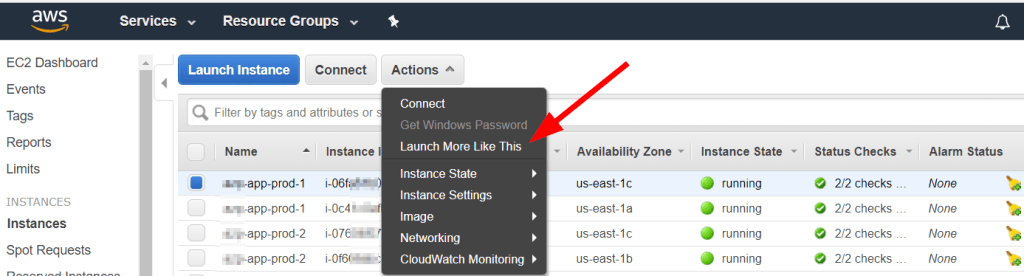
Amazon Elastic Compute Cloud (EC2) is a web-based cloud computing service provided by Amazon Web Services (AWS) that enables users to rent virtual computers on which they can run their own applications. EC2 allows users to quickly and easily provision a virtual machine (i.e., an instance) with the desired configuration, including a choice of operating system, CPU, memory, storage, and network options. 

Users can choose from a wide selection of instance types optimized for different workloads, including general-purpose, compute-optimized, memory-optimized, and storage-optimized instances. EC2 also provides other features such as Auto Scaling, which allows users to automatically adjust the number of instances based on demand, and Elastic Load Balancing, which distributes incoming traffic across multiple EC2 instances.

EC2 instances can be used for a variety of purposes, including hosting websites and web applications, running database servers, processing big data and analytics workloads, and running machine learning and AI algorithms. Users can pay for EC2 instances on a pay-as-you-go basis or opt for reserved instances to save money on long-term usage. EC2 also integrates with other AWS services, such as Amazon S3 for storage and Amazon RDS for managed databases, to provide a complete cloud computing solution.

Amazon RDS (Relational Database Service) is a managed database service provided by Amazon Web Services (AWS) that makes it easy to set up, operate, and scale a relational database in the cloud. With Amazon RDS, users can choose from several popular database engines, such as Amazon Aurora, MySQL, PostgreSQL, Oracle, and SQL Server, and run them in a fully managed environment, with automatic software patching, backup and recovery, and scaling.

Amazon RDS takes care of routine database tasks such as hardware provisioning, database setup, patching, backup, and recovery, leaving users free to focus on their core business applications. RDS also provides several scaling options, such as horizontal scaling using Read Replicas and vertical scaling using Elastic Inference, to meet the changing demands of applications.

With RDS, users can choose between several deployment options, such as single-AZ, multi-AZ, and global databases, to achieve the desired level of availability and performance for their applications. RDS also integrates with other AWS services, such as Amazon EC2, AWS Lambda, and Amazon CloudWatch, to provide a complete cloud computing solution.

By using Amazon RDS, users can achieve cost savings, higher availability, and better scalability than traditional on-premise database solutions while benefiting from the flexibility and agility of the cloud.

Note: Amazon EC2, AWS Lambda, and Amazon CloudWatch are three different services provided by Amazon Web Services (AWS) that serve different purposes:

1. Amazon EC2 is a web-based cloud computing service that allows users to rent virtual machines to run their applications. EC2 allows users to choose the configuration of their virtual machines, such as the operating system, CPU, memory, storage, and network options. Users can run a wide variety of applications on EC2, including web servers, databases, and analytics tools.

2. AWS Lambda is a serverless computing service that allows users to run code without provisioning or managing servers. With Lambda, users simply upload their code to AWS and Lambda takes care of running and scaling it in response to incoming requests. This enables users to build highly scalable, event-driven applications without worrying about managing infrastructure.

3. Amazon CloudWatch is a monitoring and management service for AWS resources. CloudWatch collects and tracks metrics, logs, and events from various AWS services, including EC2 and Lambda, and provides a unified view of the operational health of the services. CloudWatch also provides alerts and notifications based on predefined thresholds, enabling users to take corrective action proactively.

In summary, Amazon EC2 provides virtual machines for running applications, AWS Lambda provides a serverless computing environment for running code, and Amazon CloudWatch provides monitoring and management for AWS resources. While they can be used together, they serve different purposes and are designed to meet different needs.

Reach out with questions, and feel free to leave comments!