Captivating Narratives: Varied Approaches to Sharing Personal Stories in Sporting Event Broadcasts

In the realm of sports broadcasting, capturing the essence of athletes and their unique experiences is a crucial aspect of captivating viewers. To achieve this, broadcasters employ various techniques to tell the story of an individual within the context of a sporting event. This article delves into the different methods used to convey a person’s narrative, emphasizing their perspective and views rather than the producer’s own.

  1. Authentic Interviews:
    One of the most effective ways to tell someone’s story is through authentic interviews. Producers often conduct in-depth conversations with athletes, coaches, or other relevant individuals connected to the event. By allowing the interviewee to candidly share their experiences, emotions, and insights, viewers gain a deeper understanding of their journey. These interviews should focus on the subject’s perspective, allowing their unique voice to shine through.
  2. Personal Background:
    Highlighting an individual’s personal background contributes significantly to the narrative. By delving into their upbringing, challenges, and key life events, broadcasters humanize the subject and provide viewers with a more comprehensive understanding of their journey. Revealing personal anecdotes, family dynamics, or cultural influences helps forge a stronger connection between the viewers and the person being profiled.
  3. Visual Storytelling:
    Visual storytelling is a powerful tool that engages viewers on a deeper level. Broadcasters can incorporate visual elements such as archival footage, photographs, or reenactments to enhance the storytelling process. These visuals should be carefully selected to complement the subject’s narrative, capturing significant moments that have shaped their sporting career or personal life.
  4. Collaborative Production:
    Collaboration between the subject and the production team is essential to ensure an accurate and authentic portrayal. Inviting the subject to actively participate in the storytelling process allows them to share their perspective and have a say in how their story is told. This collaborative approach fosters trust and empowers the individual to have agency over their narrative.
  5. Contextualizing the Sport:
    Placing the subject’s story within the broader context of the sport they participate in is vital for viewers to grasp its significance. Exploring the historical, cultural, or social aspects of the sport helps create a richer narrative tapestry. By providing insights into the sport’s evolution, rivalries, or its impact on society, broadcasters can deepen the viewers’ appreciation for the subject’s achievements.
  6. Overcoming Adversity:
    Many athletes have overcome significant challenges to reach the pinnacle of their careers. Emphasizing the subject’s journey through adversity can be a powerful storytelling technique. Highlighting obstacles, setbacks, or personal struggles not only showcases their resilience but also inspires viewers. This approach humanizes the subject and allows viewers to relate to them on a more profound level.

When producing a piece for broadcast during a sporting event, the primary goal is to tell the story of an individual in a way that resonates with viewers. By employing techniques such as authentic interviews, exploring personal backgrounds, utilizing visual storytelling, fostering collaboration, contextualizing the sport, and highlighting the subject’s journey through adversity, broadcasters can create compelling narratives that honor the person’s perspective. Through these methods, sporting event broadcasts can captivate audiences and forge a deeper connection between viewers and the individuals they admire.

The Artistry (Yes, you read that right Artistry) of Data Analytics’ Influence: Elevating Golf Streaming Coverage

In the world of sports broadcasting, the marriage of data analytics and technology has proven to be a game-changer. Golf, a sport that demands precision and strategy, has embraced this transformative alliance, elevating the viewer experience to new heights. Data analytics, with its power to unravel hidden insights and patterns, plays a pivotal role in enhancing golf streaming coverage. This article delves into the artistry behind data analytics, highlighting its influence in revolutionizing how golf is presented and enjoyed by fans worldwide.

  1. Uncovering Player Performance Insights:
    Data analytics acts as a virtuoso conductor, orchestrating a symphony of player performance insights. Through the collection and analysis of vast amounts of data, analytics algorithms can extract valuable information about golfers’ swings, shot accuracy, and course management strategies. These insights enable broadcasters to provide viewers with real-time statistics, historical comparisons, and in-depth analysis of player performance. By understanding the nuances of the game, fans gain a deeper appreciation for the skill and decision-making prowess of their favorite golfers.
  2. Enhancing Viewer Engagement:
    Data analytics weaves a tapestry of viewer engagement, creating an immersive and interactive golf streaming experience. By integrating live data feeds and real-time analytics into broadcasts, viewers can delve into a treasure trove of captivating information. From shot trajectories and club selection to historical data and predictive analytics, fans can unravel the intricacies of each swing. These insights foster a sense of connection and engagement, as viewers become active participants in the unfolding drama of the game.
  3. Personalized Content Curation:
    Data analytics acts as a virtuoso curator, tailoring golf streaming content to the unique preferences of individual viewers. By analyzing viewing patterns, demographics, and user behavior, algorithms can recommend personalized content, including specific players, memorable shots, and related golfing events. This customized approach ensures that fans receive a curated experience that resonates with their interests, deepening their emotional connection to the game and fostering long-term engagement.
  4. Uniting Historical Context with Present Action:
    Data analytics serves as a masterful storyteller, weaving together the historical context and present action of golf events. By analyzing past performances, course statistics, and player records, analytics algorithms can provide broadcasters with insightful narratives that enrich the viewer experience. Whether highlighting a player’s quest for a career-defining victory or showcasing the challenges of a particular hole, data analytics breathes life into the stories that unfold on the greens, captivating viewers and igniting their passion for the sport.
  5. Optimizing Broadcast Production:
    Data analytics acts as a conductor of efficiency, optimizing broadcast production processes to deliver seamless and high-quality golf streaming coverage. By analyzing data on viewer preferences, engagement levels, and streaming performance, broadcasters can make real-time adjustments to deliver a smooth and uninterrupted streaming experience. Furthermore, analytics algorithms can automate tasks such as camera selection, graphics generation, and highlight reel creation, streamlining the production workflow and ensuring a polished and professional broadcast.

Conclusion:
As the curtain rises on the realm of golf streaming, data analytics takes center stage, transforming the viewer experience into a masterpiece of insight and engagement. From unraveling player performance to curating personalized content, data analytics enhances how golf is presented and enjoyed by fans around the world. As technology continues to advance, the symphony of data analytics will continue to weave its magic, creating a harmonious bond between golf, technology, and the hearts of passionate viewers.

Mogrts What About Mogrts ?? What the #%€! Are They?

Exploring Mogrts: A Comprehensive Guide to Creation, Usage, and Naming Conventions

Mogrts, short for Motion Graphics Templates, have revolutionized the way multimedia content is created and utilized. These pre-designed, customizable templates streamline the process of creating visually stunning motion graphics, making them popular across various industries. In this article, we’ll delve into what Mogrts are, their applications, naming conventions, how to create them, and the process from start to finish.

What are Mogrts?
Mogrts are pre-designed motion graphics templates created using software like Adobe After Effects or Premiere Pro. They contain animated elements, such as text, shapes, transitions, and effects, that users can customize to fit their specific needs. Mogrts offer a time-efficient solution for creating professional-looking graphics without extensive design skills.

Usage and Applications:
Mogrts find applications in a wide range of scenarios, including:

  1. Video Productions: Mogrts enable video editors to easily add visually appealing graphics, lower-thirds, titles, and transitions to their videos.
  2. Social Media Content: Mogrts can be used to create eye-catching animations for social media platforms, enhancing brand presence and engagement.
  3. Presentations: Mogrts help create dynamic slide transitions and animated elements for presentations, making them more engaging and memorable.
  4. Broadcast Design: Mogrts are extensively used in TV broadcasts to incorporate dynamic graphics, lower-thirds, and overlays seamlessly.

Naming Conventions:
To maintain organization and facilitate easy retrieval, adhering to consistent naming conventions for Mogrts is crucial. Consider including relevant information in the file name, such as the template’s purpose, style, version, and resolution.

Creating Mogrts:
To create Mogrts, follow these steps:

  1. Design in Motion Graphics Software: Use motion graphics software like Adobe After Effects or Premiere Pro to design your animated elements. Ensure the composition is set up correctly, with all necessary layers organized and labeled.
  2. Essential Parameters: Identify the customizable parameters within your design that users may want to modify, such as text, colors, or timing. Make these parameters easily accessible for customization.
  3. Export as Mogrt: Export your composition as a Mogrt file, specifying the compatible software versions and any required plug-ins. Include a preview thumbnail and a brief description to provide users with an overview of the template.

The Process from Start to Finish:

  1. Conceptualize and Design: Brainstorm ideas and design your motion graphics template in motion graphics software.
  2. Customization Options: Identify and define the parameters that users can modify within the template to suit their specific needs.
  3. Export as Mogrt: Export the template as a Mogrt file, ensuring compatibility and including a preview thumbnail and description.
  4. Distribution and Usage: Share the Mogrt file with intended users through various platforms, such as online marketplaces, cloud storage, or direct distribution.
  5. Customization by Users: Users import the Mogrt file into their chosen editing software and customize the parameters to match their content.
  6. Integration into Projects: Users incorporate the customized Mogrt into their projects, leveraging its animated elements seamlessly.
  7. Iteration and Updates: Continuously refine and update your Mogrts based on user feedback, emerging trends, or new software capabilities.

Mogrts offer a convenient, time-saving solution for incorporating visually stunning motion graphics into various multimedia projects. By adhering to consistent naming conventions, creating customizable templates, and following a structured process, you can create and utilize Mogrts effectively, enhancing your creative workflows and producing captivating visual content.

Automating Tedious Tasks in Digital Editing: Unleashing Creativity with AI

Digital editing is a complex process that often involves repetitive and time-consuming tasks, which can impede the creative flow of editors. However, the integration of artificial intelligence (AI) technology has revolutionized the editing landscape, automating tedious tasks and allowing editors to focus more on their creative vision. This article explores how AI-powered tools, such as Adobe Premiere’s Auto Reframe and Avid’s PhraseFind and ScriptSync, streamline the editing process, saving time and effort while enhancing productivity and creativity.

Automated Resizing and Repositioning with Adobe Premiere’s Auto Reframe:
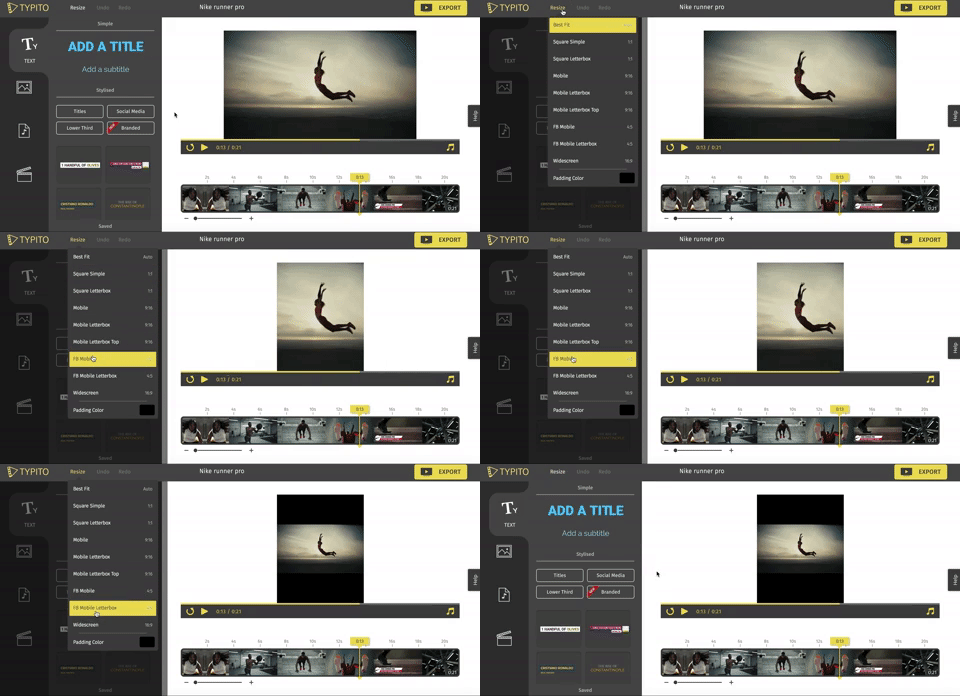
One of the most time-consuming tasks in digital editing is resizing and repositioning footage to fit various aspect ratios. Adobe Premiere’s AI-powered plugin, Auto Reframe, simplifies this process by automatically analyzing the content and intelligently reframing the footage. By leveraging AI algorithms, Auto Reframe can identify key elements within the frame and dynamically resize and reposition it to maintain visual focus. This automation saves hours of manual adjustment, allowing editors to allocate more time to creative decision-making and storytelling.

Streamlining Dialogue Search and Transcript Syncing with Avid’s AI-Based Tools:
Locating specific dialogue or syncing transcripts is another labor-intensive task in editing. Avid’s AI-based tools, such as PhraseFind and ScriptSync, provide efficient solutions to streamline these processes. PhraseFind utilizes AI algorithms to automatically detect dialogue within clips, eliminating the need for manual transcription or time-consuming manual searching. Editors can quickly search for specific dialogue or keywords, significantly reducing the time spent on content retrieval. Additionally, Avid’s ScriptSync automatically syncs transcripts with the corresponding footage, ensuring accurate alignment and simplifying the editing workflow. These AI-powered tools save valuable time and effort, enabling editors to focus on the creative aspects of their projects.

Enhancing Efficiency and Boosting Productivity:
By automating tedious tasks, AI-powered editing tools enhance efficiency and boost productivity. Editors can allocate more time and energy towards refining their creative vision, experimenting with different storytelling techniques, and achieving the desired visual impact. The automation of tasks like resizing, repositioning, and dialogue search allows professionals to work more efficiently, meeting tight deadlines without compromising on quality.

As AI technology continues to advance, the possibilities for automating tasks in digital editing are limitless, unlocking new avenues for creativity and productivity in the editing realm, ultimately revolutionizing the way professionals approach their craft.

Enhancing Video Content with Integrated Playout Graphics (IPGs)

In broadcasting and video environments, Integrated Playout Graphics (IPGs) play a vital role in enhancing the visual appeal and interactivity of video content. These systems enable real-time graphics rendering and the seamless insertion of dynamic graphics and text overlays into live or pre-recorded video. In this article, we will explore the various aspects of IPGs and how they contribute to a captivating viewing experience.

1. Real-Time Graphics Rendering:

IPGs offer real-time graphics rendering capabilities, allowing broadcasters and content creators to generate visually engaging graphics on the fly. Whether it’s lower thirds, logos, tickers, or full-screen graphics, IPGs enable the creation and insertion of these elements in real-time, enhancing the viewer’s experience. This real-time capability is particularly valuable for live broadcasts, as it enables instant updates and changes to graphics, ensuring accurate and up-to-date information is presented to the audience.

2. Dynamic and Interactive Elements:

IPGs empower content creators to add dynamic and interactive elements to their video content. These can include animated graphics, transitions, overlays, and interactive elements like polls, social media feeds, or live data updates. By incorporating these elements, IPGs make video content more engaging, immersive, and visually appealing. This interactivity encourages viewer participation and creates a more dynamic viewing experience.

3. Seamless Integration:

IPGs seamlessly integrate with existing video workflows, making them a valuable tool for broadcasters and content producers. They can be integrated with playout servers, video switchers, automation systems, and other broadcasting equipment, allowing for efficient and streamlined operations. This integration ensures that graphics and text overlays are inserted seamlessly into the video content, without any disruption or delay. Additionally, IPGs often support industry-standard protocols, making them compatible with various video formats and delivery platforms.

4. Customization and Branding:

IPGs offer extensive customization options, allowing broadcasters to align graphics with their brand identity. From choosing fonts, colors, and layouts to incorporating logos and visual elements, IPGs provide flexibility in creating graphics that reflect the brand’s aesthetics. This customization helps in maintaining a consistent visual identity across different video content and enhances brand recognition. Content creators can also create templates and presets for graphics, making it easier to generate graphics quickly and consistently.

Integrated Playout Graphics (IPGs) play a crucial role in enhancing video content by providing real-time graphics rendering and the seamless integration of dynamic and interactive elements. With their ability to customize graphics and ensure seamless integration, IPGs contribute to a captivating and visually appealing viewing experience. As technology continues to advance, IPGs will remain an essential tool for broadcasters and content creators in delivering engaging and immersive content.

Enhancing Your Livestream with Video Inserts and Vignettes: A Technical Guide

Incorporating video inserts or vignettes can add value to your livestream and provide hosts with a breather.  In thid technical guide, we will explore the steps to seamlessly integrate video inserts, discuss the benefits they offer, and provide tips for maximizing their impact on your livestream.

1. Planning and Pre-production:

a. Determine Purpose and Content: Identify the purpose of your video inserts. Are they meant to provide additional information, showcase sponsors, or simply give you a break? Define the content and style that aligns with your livestream’s theme and objectives.

b. Scripting and Storyboarding: Develop a script or outline for your video inserts to ensure a cohesive narrative. Storyboard key scenes or shots to visualize the flow and transitions.

2. Recording and Editing Video Inserts:

a. Equipment and Setup: Utilize a good quality camera, microphone, and appropriate lighting to capture professional-looking video inserts. Ensure consistency in audio and visual quality with your main livestream.

b. Filming Techniques: Use different angles, close-ups, or creative shots to make your video inserts visually engaging. Experiment with camera movements, framing, and composition to enhance the overall appeal.

c. Editing Software: Use video editing software such as Adobe Premiere Pro, Final Cut Pro, or iMovie to edit your video inserts. Trim unnecessary footage, add transitions, graphics, text overlays, and background music to enhance the production value.

3. Integration into Your Livestream:

a. Timing and Transitions: Determine the ideal moments to insert your videos. Consider using transitions like fades, dissolves, or cuts to smoothly transition between your livestream and the video inserts.

b. Livestream Overlay: Customize an overlay or lower third graphic that includes your branding, title, or key information to maintain consistency across your livestream and video inserts.

c. Streaming Software or Hardware: Use streaming software like OBS Studio or vMix to incorporate your video inserts seamlessly. Set up scene transitions or media sources to switch between your livestream and video inserts effortlessly.

4. Adding Value and Breather:

a. Educational or Informative Content: Include video inserts that provide valuable information, tips, or insights related to your livestream’s topic. This adds educational value to your stream and gives you a break from live hosting.

b. Sponsored or Promotional Content: If you have sponsors or partners, consider incorporating video inserts that highlight their products, services, or messages. This adds value to your sponsors and allows you to take a breather while maintaining engagement.

c. Entertainment or Intermission: Insert entertaining video clips, interviews, or behind-the-scenes footage during breaks or intermissions to engage your audience and provide yourself with a brief respite.

5. Testing and Rehearsing:

a. Technical Checks: Before going live, test the integration of your video inserts with your streaming software to ensure a smooth transition. Check audio levels, video quality, and timing to avoid any technical glitches.

b. Rehearsals and Timing: Practice your transitions and timing during rehearsals to ensure that your video inserts align seamlessly with the flow of your livestream. This will help you maintain control and ensure a polished final production.

By incorporating video inserts or vignettes into your livestream, you can add value, enhance engagement, and give yourself a breather while maintaining a professional and engaging production. Thorough planning, quality recording and editing, seamless integration, and valuable content are key components to successfully incorporating video inserts into your livestream. With practice and experimentation, you can create an immersive and captivating livestream experience for your audience.

Mastering the Run of Show: A Live-streaming Guide

When it comes to executing a successful livestream, having a well-structured plan is crucial. One effective way to achieve this is by creating a run of show. In this article, we will explore the art of creating a run of show and provide examples for a livestream on creating a livestream.

Understanding the Run of Show:

A run of show is a detailed timeline that outlines the sequence of events, segments, and key elements of a livestream. It serves as a blueprint for the entire production, helping you stay organized and ensuring a seamless and engaging livestream experience for your audience.

Creating a Run of Show for a Livestream on Creating a Livestream:

1. Pre-Show Preparation (15 minutes):

   – Set up the livestreaming equipment and test audio/video quality.

   – Do a run-through of the content and ensure all necessary materials are ready.

   – Conduct a final technical check before going live.

2. Introduction and Overview (10 minutes):

   – Start the livestream with a warm welcome and introduce yourself.

   – Provide a brief overview of what the livestream will cover.

   – Share the objectives and goals of the livestream.

3. Livestreaming Basics (20 minutes):

   – Explain the fundamentals of livestreaming, including platforms and equipment.

   – Discuss the importance of engaging content and building an audience.

   – Share tips for creating a compelling livestreaming experience.

4. Equipment and Setup (15 minutes):

   – Demonstrate and explain the necessary equipment for livestreaming.

   – Detail the step-by-step process of setting up a livestreaming setup.

   – Offer recommendations for optimizing audio, video quality, and lighting.

5. Interactivity and Audience Engagement (15 minutes):

   – Discuss methods to interact with viewers, such as chats, polls, and Q&A sessions.

   – Share strategies for fostering engagement and building a community.

   – Highlight the importance of audience participation in livestreaming success.

6. Troubleshooting and Best Practices (15 minutes):

   – Address common technical issues and provide troubleshooting solutions.

   – Share best practices for handling challenges during a livestream.

   – Offer tips for maintaining professionalism and adapting to unexpected situations.

7. Q&A Session (10 minutes):

   – Allocate time for viewers to ask questions related to livestreaming.

   – Answer selected questions and provide insightful responses.

8. Conclusion and Call to Action (5 minutes):

   – Recap the key points covered during the livestream.

   – Thank the viewers for their time and participation.

   – Encourage viewers to subscribe or follow for future livestreams and additional content.

A well-executed run of show is essential for delivering a smooth and engaging livestream experience. By following a detailed plan like the example provided above, you can ensure that your livestream on creating a livestream is organized, informative, and captivating for your audience. Remember, a well-prepared run of show sets the stage for a successful live-streaming production.

The Art of Creating a Rundown: A Livestreaming Guide

Live-streaming is an incredibly popular medium for sharing content and engaging with audiences in real-time. However, without a well-structured plan, it can be challenging to keep your live-stream on track and maintain viewer interest. One effective way to ensure a smooth and engaging live-stream is by creating a rundown. In this article, we will explore the art of creating a rundown and provide examples for a livestream on creating a livestream itself.

What is a Rundown?

A rundown is a detailed outline or script that serves as a roadmap for your live-stream. It helps you organize your content, transitions, and timing, ensuring a cohesive and professional presentation. A well-crafted rundown provides a clear structure, prevents confusion, and allows you to stay on track throughout your live-stream.

Creating a Rundown for a Live-stream on “Creating a Live-stream”:

1. Introduction (5 minutes- times given are for example purposes only):

   – Welcome viewers and introduce yourself.

   – Briefly explain the purpose of the livestream.

   – Outline the topics you will cover.

2. Understanding Live-streaming (10 minutes):

   – Define live-streaming and its benefits.

   – Discuss popular live-streaming platforms.

   – Highlight key technical requirements for a successful livestream.

3. Equipment and Setup (15 minutes):

   – Explain the essential equipment for livestreaming.

   – Demonstrate how to set up a basic livestreaming setup.

   – Provide tips and recommendations for optimizing audio and video quality.

4. Engaging Your Audience (10 minutes):

   – Discuss strategies for attracting and retaining viewers.

   – Explore interactive features like chat, polls, and Q&A sessions.

   – Share tips on fostering audience engagement and building a community.

5. Troubleshooting and Best Practices (10 minutes):

   – Address common technical issues and their solutions.

   – Offer best practices for handling unforeseen challenges during a livestream.

   – Provide tips for creating backup plans and maintaining professionalism.

6. Q&A Session (10 minutes):

   – Allocate time for viewers to ask questions.

   – Answer selected questions related to livestreaming.

7. Conclusion (5 minutes):

   – Recap the main points covered in the livestream.

   – Thank viewers for their time and participation.

   – Encourage them to subscribe or follow for future livestreams.

Creating a rundown for your livestream is an essential step in delivering a structured and engaging experience to your audience. By following a well-organized plan like the example provided above, you can ensure that your livestream is informative, engaging, and enjoyable for viewers. Remember, a well-prepared rundown sets the foundation for a successful live-streaming experience.

Tips: The Role of Consistency in Live Streaming

Consistency is the backbone of successful live streaming. Maintaining a regular and predictable schedule, content format, and overall experience is essential for building a loyal audience and maximizing the impact of live streaming efforts. In this article, we will explore the reasons why consistency is paramount in the world of live streaming.

  1. Establishing Trust and Loyalty:
    Consistency breeds trust. When viewers know what to expect from a live streamer, they feel more comfortable investing their time and attention. By consistently delivering high-quality content at scheduled times, streamers build a loyal fan base that eagerly anticipates their streams, knowing they won’t be disappointed.
  2. Setting Expectations: Consistency helps set clear expectations for viewers. By maintaining a consistent format, such as a particular theme or style, streamers provide a sense of familiarity and coherence. This allows viewers to understand what they will gain from each stream, enabling them to make informed decisions about whether to tune in regularly.
  3. Increasing Discoverability:
    Consistent live streaming improves discoverability. When streamers adhere to a regular schedule, viewers know exactly when and where to find them. This predictability helps attract new viewers, as they can rely on a consistent streaming presence. Discoverability is crucial for growing an audience and expanding reach across streaming platforms.
  4. Enhancing Branding and Identity: Consistency strengthens a streamer’s brand and identity. By maintaining a consistent visual style, tone, and overall experience, streamers establish a recognizable and memorable presence. This consistency solidifies their brand identity in the minds of viewers, making them stand out in a saturated streaming landscape.
  5. Improving Production Quality: Consistency allows streamers to refine their production quality over time. By consistently streaming, they gain valuable experience and learn what works best for their audience. This enables them to make incremental improvements, enhancing the overall quality of their streams and delivering a more polished and professional experience.
  6. Fostering Engagement and Interaction: Consistency encourages audience engagement and interaction. When viewers know a streamer will be live at a specific time, they can plan to participate, share feedback, and interact with the streamer and fellow viewers. Regular streams create a sense of community, where viewers can connect and engage with like-minded individuals.
  7. Building Long-term Growth: Consistency is a long-term strategy for growth. By consistently delivering valuable content, streamers foster a dedicated following that is more likely to share their streams, recommend them to others, and contribute to their growth. Over time, this organic growth can lead to increased viewership and opportunities for monetization.

Consistency is the cornerstone of success in live streaming. It builds trust, sets expectations, enhances branding, improves production quality, fosters engagement, and fuels long-term growth. By recognizing the importance of consistency and implementing it in their streaming efforts, content creators can forge lasting connections with their audience and thrive in the dynamic world of live streaming.