How to Choose the Right Live-streaming Platform

Live streaming has become an increasingly popular way for people to share their content with the world. Whether you are a gamer looking to stream your gameplay, a musician wanting to perform for your fans, or a business owner looking to connect with your customers, there are many different platforms available for you to use. However, with so many different options, it can be overwhelming to decide which platform is best for your needs. In this article, we will discuss some key factors to consider when choosing a platform for your livestream.

1. Audience

The most important factor to consider when choosing a platform for your livestream is your audience. For example, if you are targeting a younger demographic, you may want to consider using platforms like Twitch or TikTok. If you are targeting a more professional audience, you may want to consider using platforms like LinkedIn or Zoom.

2. Purpose

Another important factor to consider when choosing a platform for your livestream is your purpose. Different platforms are designed for different types of content and audiences. For example, if you are streaming a gaming tournament, you may want to consider using platforms like Twitch or YouTube Gaming. If you are streaming a webinar or conference, you may want to consider using platforms like Zoom or Microsoft Teams.

3. Features

Each platform offers different features and tools to help you create and manage your livestream. Some platforms offer more advanced features like built-in chatbots, donation systems, and custom overlays. Other platforms may offer more basic features like live video and chat. It is important to consider which features are most important to you and your audience when choosing a platform.

4. Integration

If you already have a following on other social media platforms, it may be useful to choose a platform that integrates well with those platforms. For example, if you have a large following on Instagram, you may want to consider using Instagram Live to reach your audience.

5. Cost

Finally, it is important to consider the cost of the platform. Some platforms are free, while others require a monthly subscription or charge a fee for certain features. It is important to consider your budget and what features are most important to you when choosing a platform.

There are many different factors to consider when choosing a platform for your livestream. It is important to consider your audience, purpose, features, integration, and cost when making your decision. By taking these factors into account, you can choose a platform that will help you reach your audience and achieve your livestreaming goals.

Like, Comment, Follow-Me, Subscribe – It’s Free!

From the Sidelines to the Big Screen: How Venues are Using Projection Technology to Enhance Sports Events

Venues use projection technology to elevate the game-day experiences in several ways, including:

  • Projection Mapping: Is used to create immersive experiences for fans. Projection mapping involves projecting images and videos onto surfaces such as walls, floors, or ceilings to create the illusion of movement or depth. This technology can be used to create dynamic displays during pre-game introductions, halftime shows, or other events.
  • Digital Signage: Venues can use digital signage to display scores, stats, and other information to fans. Digital signage allows venues to update information in real-time and can be customized to display different types of content depending on the event. This technology can also be used to display advertisements or promotions to fans.
  • Interactive Displays: Venues can use interactive displays to engage fans and provide them with a more immersive experience. Interactive displays can include touchscreens, virtual reality experiences, and augmented reality experiences. These displays can be used to provide fans with information about the game, players, or venue, or they can be used to create interactive games or challenges for fans to participate in.
  • Light Shows: Venues can use projection technology to create dynamic light shows during pre-game introductions or halftime shows. This technology can be used to project images and videos onto the playing surface, creating a visually stunning display for fans.

Some other ways that venues use projection technology to elevate the game-day experience include:

  • Customizable lighting effects that change based on the game’s progress or score
  • 3D projection mapping to create a fully immersive experience
  • Interactive floor projections that respond to fans’ movements
  • Live streaming of the game on large screens
  • Use of holographic technology to bring players or mascots to life
  • Digital overlays on the playing surface to create interactive games or challenges
  • Use of LED lighting for dynamic and colorful displays
  • Real-time social media feeds displayed on screens throughout the venue
  • Use of augmented reality technology to provide fans with additional information or experiences
  • Projection of “fan cams” to engage the crowd and create a more interactive experience
  • Use of projection technology to create realistic simulations of the game or venue
  • Use of projection technology to create stunning visual effects during pre-game introductions or halftime shows
  • Projection of sponsor logos or advertisements in creative ways
  • Use of projection technology to create interactive photo booths or selfie stations for fans
  • Use of projection technology to create unique and immersive soundscapes
  • Projection of interactive games or challenges onto the walls or ceilings of the venue
  • Use of projection technology to create dynamic and engaging pre-game videos or introductions
  • Use of projection technology to create custom animations or graphics for the venue or team
  • Integration of projection technology with live music performances or concerts
  • Use of projection technology to create virtual experiences for fans who can’t attend the game in person.

Overall, the use of projection technology in venues can enhance the game-day experience for fans, providing them with new and exciting ways to engage with the game and the venue. With the continued development of projection technology, the possibilities for creating unique and immersive experiences for fans are endless.

101: Troubleshooting SCTE-35 DAI A Quick Guide

Sometimes things just don’t work. You’ve rebooted, run reports, and you just need to pause. Here are some steps to troubleshoot SCTE-35 DAI issues:

1. Check for SCTE-35 markers: The first step in troubleshooting SCTE-35 DAI issues is to check if the SCTE-35 markers are being inserted into the video stream correctly. You can use a tool like SCTE-35 Analyzer to check if the markers are being sent at the appropriate times and if their contents are correct.

2. Check your ad server: If the SCTE-35 markers are being sent correctly, the next step is to check your ad server. Ensure that the ad server is sending ad inventory to the video player at the appropriate times and that the ad creative is correct.

3. Check your video player: If the ad server is sending ad inventory correctly, the issue may be with your video player. Ensure that your video player is configured correctly to receive SCTE-35 markers and that it is capable of processing them correctly. Check the video player logs for any errors or warnings related to SCTE-35 processing.

4. Check for network issues: If the SCTE-35 markers, ad server, and video player are all working correctly, but the ads are still not showing up, there may be a network issue. Check for any network issues that may be preventing the video player from receiving the ad inventory correctly.

5. Test with different devices and platforms: If the issue is only occurring on certain devices or platforms, test with different devices and platforms to identify if it is a device-specific issue.

6. Contact your ad server or video player provider: If the above steps do not resolve the issue, contact your ad server or video player provider for further assistance. They may be able to provide more targeted troubleshooting steps or identify any issues specific to their platform.

LPGA Cognizant Founders’ Cup 2023 ReCap

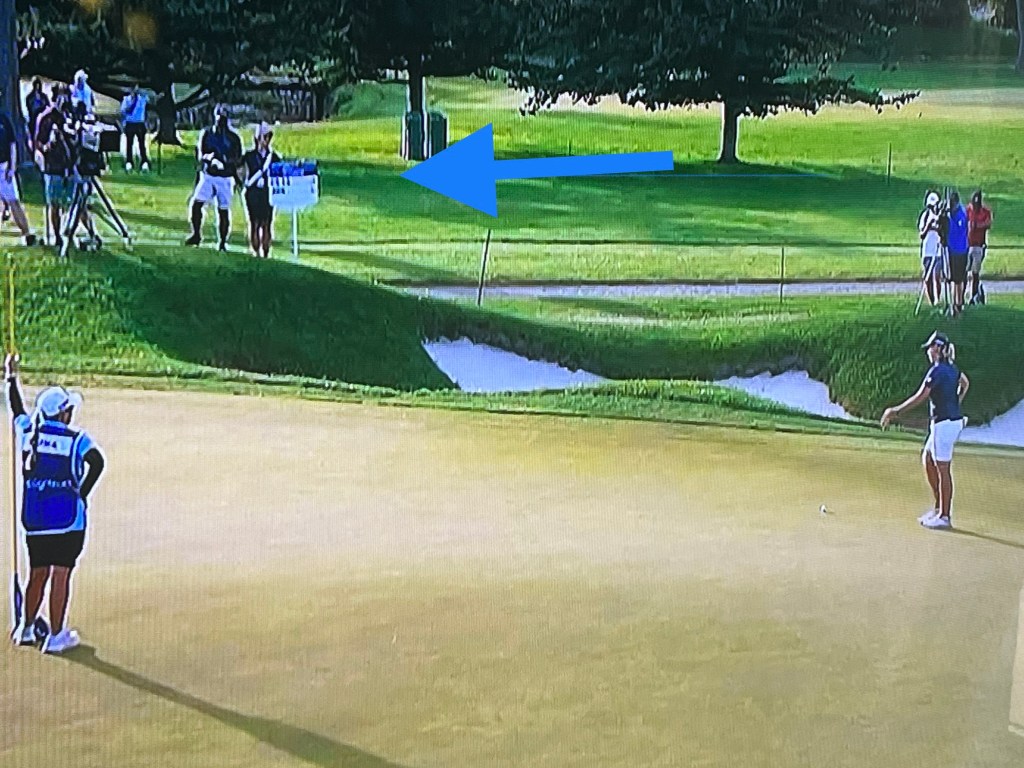
To my surprise after working the event I actually found a picture of Ashleigh Buhai putting with me in the background as her score bearer (I stood where I wouldn’t be in her putting site-line).

The LPGA’s Cognizant Founders’ Cup was an incredible experience. I was a standard bearer for 2 days, and 3 separate pairings. The Third Round: Ryan O’Toole & Gemma Dryburgh were both spectacular. For the Fourth (Final) Round Pairings I worked with: Yu-Sang Hou & Annie Park, then Ashleigh Buhai & Hae Ran Ryu, I had the opportunity to witness some of the world’s best golfers in action.

The event was held at The Upper Montclair Country Club, in Clifton, NJ. The weather was perfect, and the atmosphere was electric from start to finish. The tournament was played over four days, and the level of competition was intense. The golfers were all focused on winning the tournament, and it was clear that every shot mattered.

As a standard bearer, my job was to carry a sign displaying the players’ scores and walk with them around the golf course. It was an honor to be so close to the action, and I was amazed by the skill and precision of the golfers.

All are/were fantastic players, but Ashleigh Buhai and Hae Ran Ryu both finished in the top 4.  It was a privilege to be a standard bearer for all 6 players.  They were gracious and kind.  I was truly moved at how much time they all gave to the young ladies’ golfing “clinic” held right there on the grounds. 

The event production was well done.   Was it perfect?  – no, there were many pain points, but the attendees did not seem to notice. The organizers had put much effort into making sure that everything ran relatively smoothly, and it showed. The course was in great condition, and the facilities were top-notch. There were plenty of food and drink options available, and the staff were all friendly and helpful.

One of the highlights of the tournament was the Pro-Am event, which took place on the Wednesday before the tournament started. This gave amateur players the chance to play with the professionals and experience what it’s like to compete at the highest level. It was great to see so many people getting involved and enjoying the game of golf.

Another highlight was the closing ceremony, which of course took place on the final day of the tournament. The atmosphere was electric as the golfers made their way to the 18th hole, and the crowd cheered them on every step of the way.

In the end, it was Jin Young Ko who came out on top in a sudden death round with the amazing Minjee Lee. An impressive match-up to say the least.

Ashleigh Buhai finished in third place, and Hae Ran Ryu in fourth, both with strong performances throughout the tournament. Both “burned” many of the hole rims throughout the competition.  Those misses were so so close, it could break your heart.

Overall, the LPGA’s Cognizant Founders Cup was an amazing experience. It was a honor and a privilege to be so close to the action to the end.  I witnessed some of the world’s best golfers live in action. 

Thank you Ladies!

Sports Broadcasting Tracking Systems

Broadcasters and Sports Teams use varied tracking systems to enhance the viewer’s experience, as well as tracking players’ performance and stats.

Some examples:

1. NFL Football: The NFL uses a tracking system called Next Gen Stats, which uses sensors that are embedded in the shoulder pads of players to track their movements and performance on the field. This system captures data such as player speed, acceleration, and distance traveled, which is then used by broadcasters to create enhanced graphics and visualizations for viewers.

2. Major League Baseball: MLB uses a system called Statcast, which uses cameras and radar to track the movements of the ball and players on the field. This system captures data such as pitch velocity, spin rate, launch angle, and exit velocity, which is then used by broadcasters to provide real-time analysis and insights for viewers.

3. Major League Soccer: MLS uses a system called Opta, which collects data on player performance and match statistics. This data is then used by broadcasters to provide real-time analytics and insights, such as player heat maps, pass completion rates, and shot accuracy.

4. Basketball: The NBA uses a system called SportVU, which uses cameras and sensors to track player and ball movement on the court. This system captures data such as player speed, distance traveled, and shot trajectory, which is then used by broadcasters to provide enhanced visualizations and real-time analytics for viewers.

5. Golf: Golf has multiple tracking systems, including ShotLink, which uses lasers and cameras to track the trajectory and location of each shot on the course. This data is then used by broadcasters to provide real-time analysis and insights for viewers, such as distance to the hole, putting accuracy, and shot dispersion. Other golf tracking systems include TrackMan, which uses radar to track ball flight, and Toptracer, which uses cameras to track the flight path of each shot.

Top Live Broadcast Providers, Overview: CP Communications, NEP, Broadcast Solutions, Gearhouse Broadcast, & Gravity Media

There are Many Live Broadcast Event Companies out there, all with their own range of services.  Following is a short overview of some of them.  Feel Free to chime in with others…..

CP Communications is an audiovisual and live event production company that provides services for sports and entertainment events. They specialize in live event production, audio and video equipment rental, and staging and lighting design. The company offers a range of services, including:

1. Live event production – live event production services for sports, music, and entertainment events. This includes production planning, camera coverage, audio and video mixing, and on-site technical support.

2. Audio and video equipment rental -offers a range of audio and video equipment rental services, including cameras, microphones, speakers, and projectors. They also provide on-site technical support for equipment setup and operation.

3. Staging and lighting design – staging and lighting design services for live events, including custom stage design, lighting installation, and video projection mapping.

NEP Group is a leading provider of production services, engineering solutions, and media management for live sports and entertainment events worldwide. NEP Group provides a wide range of services, including:

1. Live event production – production services for sports, music, and entertainment events. This includes production planning, camera coverage, audio and video mixing, and on-site technical support.

2. Remote production – remote production services for sports events, allowing broadcasters to produce live events from a centralized location. This includes remote camera control, audio and video mixing, and on-site technical support.

3. Media management – media management services, including content storage, archiving, and distribution. This includes video editing, metadata tagging, and asset management.

4. Technical support – technical support services for audiovisual equipment and systems, including equipment rental, maintenance, and repair.

Broadcast Solutions is a global provider of production services and engineering solutions for sports, music, and entertainment events. The company offers a range of services, including live event production, remote production, and media management.

Gearhouse Broadcast is a global provider of production services and engineering solutions for sports, music, and entertainment events. The company offers a range of services, including live event production, remote production, and equipment rental.

Gravity Media is a global provider of production services and engineering solutions for sports, music, and entertainment events. The company offers a range of services, including live event production, remote production, and equipment rental. Gravity Media also provides specialized solutions for specific industries, such as esports and motorsports.

The differences between the above competitors include their range of services, geographic coverage, and industry specialization. It is recommended to evaluate the features, capabilities, and pricing of each provider before making a decision.

Quick Overview Sports Graphics

There are several broadcasting sports live-action tracking devices that are used to track the performance of athletes during live sporting events. Here are some of the most popular broadcasting sports live-action tracking devices and their graphics:

1. Hawk-Eye: Hawk-Eye is a widely used tracking device in sports such as baseball, tennis, cricket, and football. It uses a combination of cameras and algorithms to track the trajectory of the ball and player movement. The graphics in Hawk-Eye are highly advanced, providing viewers with various angles and replays of the action.

2. SportVU: SportVU is a tracking device that is widely used in basketball. It uses six cameras mounted on the rafters of the stadium to track the movement of players and the ball. The graphics in SportVU are highly detailed, providing viewers with information such as player speed, distance covered, and shot trajectories.

3. Prozone: Prozone is a tracking device that is widely used in football. It uses a combination of cameras and software to track the movement of players on the pitch. The graphics in Prozone are highly detailed, providing viewers with information such as player heat maps, passing networks, and goal-scoring opportunities.

4. Catapult: Catapult is a tracking device that is widely used in various sports such as football, rugby, and basketball. It uses wearable sensors that are attached to players to track their movement and performance. The graphics in Catapult are highly customizable, allowing coaches and analysts to track specific performance metrics.

5. Golf: Golf has been using tracking devices for several years now, and one of the most popular devices is ShotLink. ShotLink uses lasers and cameras to track the movement of the ball and players during a golf tournament. The graphics in ShotLink are highly detailed, providing viewers with information such as shot distance, ball speed, and spin rate.

• TrackMan technology is another popular tracking device used in football and golf. It uses radar technology to track the movement of the ball, providing detailed data on ball flight and accuracy. 

For Golf TrackMan can also provide information on clubhead speed, ball spin rate, launch angle, and more. Additionally, it can provide a 3D representation of the ball flight, allowing players and coaches to analyze and optimize their shots.

The graphics in TrackMan are highly detailed, providing golfers with information such as shot distance, ball speed, and spin rate. This information helps golfers to better understand their shots and make adjustments to their swing and club selection.

Overall, TrackMan technology has become an essential tool for golfers, providing them with detailed data and graphics to help improve their game.

6. Baseball: Baseball uses a tracking device called Statcast, which uses a combination of cameras and radar to track the movement of the ball and players during a game. The graphics in Statcast are highly detailed, providing viewers with information such as pitch speed, launch angle, and exit velocity. Additionally, Statcast can also track the defensive positioning of players on the field.

Football has multiple tracking devices that are used to provide detailed data and graphics during live events. Here are some popular football tracking devices:

1. STATSports: STATSports is a wearable tracking device that is used to track the movement and performance of football players. It uses GPS and accelerometers to track player movement, providing data on distance covered, speed, and heart rate. The graphics in STATSports are highly detailed, providing coaches and analysts with information on player performance and fatigue.

2. Zebra Technologies: Zebra Technologies is a tracking device that is used to track player movement and performance during a football game. It uses RFID tags that are placed inside player shoulder pads to track their movements on the field. The graphics in Zebra Technologies are highly detailed, providing coaches and analysts with information on player speed, distance covered, and more.

3. ChyronHego: ChyronHego is a tracking device that uses cameras and software to track player movement and performance during a football game. The graphics in ChyronHego are highly customizable, allowing coaches and analysts to track specific performance metrics such as passing accuracy, tackles, and interceptions.

Track and field also use tracking devices to provide viewers with detailed data and graphics during live events. One of the most popular tracking devices used in track and field is called Omega Timing.

1. Omega Timing uses a combination of cameras, sensors, and timing technology to track the movement of athletes during a race. The graphics in Omega Timing are highly detailed, providing viewers with information such as race times, split times, and finishing positions. Additionally, Omega Timing can also track the performance of athletes in field events such as the long jump and high jump.

Overall, Omega Timing has become an essential tool for track and field events, providing viewers with detailed data and graphics to enhance their viewing experience.

Broadcasters utilize various brands, models, and features for their sports broadcasting graphics and lower-third generators:

1. ChyronHego:
– LyricX: Provides real-time 3D graphics, video clips, and animations, as well as advanced data visualization tools.
– Prime: Offers a streamlined workflow for creating and delivering graphics, as well as a variety of templates and design tools.
– CAMIO: Allows for centralized management of graphics and content, as well as integration with third-party data sources.

2. Ross Video:
– XPression: Provides real-time 3D graphics and animation, as well as support for virtual sets and augmented reality.
– Inception: Offers a web-based platform for creating and delivering graphics, as well as social media integration and playlist management.
– DashBoard: Allows for remote control and monitoring of graphics and production equipment, as well as customizable user interfaces.

3. Vizrt:
– Viz Trio: Provides real-time 2D and 3D graphics, video clips, and animations, as well as support for virtual sets and augmented reality.
– Viz One: Offers a centralized media asset management system, as well as tools for creating and delivering graphics and video content.
– Vizrt Social TV: Allows for integration with social media platforms and real-time data visualization.

4. Avid:
– Maestro | Designer: Provides real-time 3D graphics and animation, as well as support for virtual sets and augmented reality.
– Maestro | Live: Offers a web-based platform for creating and delivering graphics, as well as support for social media integration and data visualization.
– Maestro | News: Allows for centralized management of graphics and content, as well as integration with third-party data sources.

Overall, these graphics and lower-third generators are chosen for their advanced capabilities, ease of use, and integration with other production equipment and software. Each of these solutions has its own unique features and advantages, allowing broadcasters to create high-quality graphics and lower-thirds that enhance the viewer experience during a live sports broadcast.

Production Tips: Flawless Live Television Events

Every live televised event has its challenges. Whether you’re producing sports, news, gaming events, each has different, and similar demands. If you keep the following in mind during the pre through post process, it can be a flaw-free event and a fantastic experience for not only the audience, but your crew and stakeholders.

1. Plan ahead and create a comprehensive rundown of the event: This means taking the time to plan out every aspect of the event, from the content to the technical requirements. Creating a comprehensive rundown of the event helps ensure that everything is accounted for and that everyone is on the same page.

2. Hire experienced professionals for the technical crew and production team: Hiring experienced professionals ensures that the technical and production aspects of the event are handled by people who know what they’re doing. This helps reduce the likelihood of technical issues and ensures a high-quality production.

3. Select the right equipment and cameras for the event: The right equipment and cameras can make a big difference in the quality of the production. Make sure to select equipment that is appropriate for the size and scope of the event.

4. Conduct a site survey to ensure proper lighting and sound: A site survey helps identify any potential issues with lighting and sound, and allows you to make adjustments before the event.

5. Prepare contingency plans for possible technical issues or emergencies: No matter how well you plan, technical issues and emergencies can still arise. It’s important to have contingency plans in place to ensure that the event can continue even if something goes wrong.

6. Rehearse the event with the crew and talent: Rehearsing the event helps ensure that everyone knows their roles and responsibilities, and that the event runs smoothly.

7. Assign clear roles and responsibilities to the crew and talent: Clear roles and responsibilities help ensure that everyone knows what they’re supposed to be doing, which helps reduce confusion and mistakes.

8. Use a production script to ensure smooth transitions and timing: A production script helps ensure that the event runs smoothly and that everything is timed properly.

9. Have backup equipment on hand: Backup equipment helps ensure that the event can continue even if something goes wrong with the primary equipment.

10. Use a dedicated communication system for the crew: A dedicated communication system helps ensure that everyone can communicate with each other quickly and easily.

11. Use multiple camera angles to capture different perspectives: Multiple camera angles help provide a more dynamic viewing experience and allow the production team to capture different perspectives.

12. Use graphics and lower-thirds to provide context and information: Graphics and lower-thirds can help provide context and information to the audience, which can enhance their understanding and enjoyment of the event.

13. Use music and sound effects to enhance the viewing experience: Music and sound effects can help enhance the viewing experience and make the event more engaging and entertaining.

14. Use pre-produced video packages to break up the live content: Pre-produced video packages can help break up the live content and provide variety for the audience.

15. Use a teleprompter for on-air talent: A teleprompter can help on-air talent stay on script and deliver their lines smoothly.

16. Use a countdown clock to keep track of timing: A countdown clock helps ensure that the event stays on schedule and that everything is timed properly.

17. Use social media to engage with the audience and promote the event: Social media can help you engage with the audience, promote the event, and provide updates before, during, and after the event.

18. Use a delay system to allow for editing or censoring if necessary: A delay system can help you edit or censor content if necessary, which can be useful in live events where unexpected things can happen.

19. Use a live streaming service to reach a wider audience: Live streaming services can help you reach a wider audience, particularly those who are unable to attend the event in person.

20. Use closed captioning for accessibility: Closed captioning helps make the event accessible to people who are deaf or hard of hearing.

21. Use a green screen for virtual backgrounds or augmented reality: A green screen can be used to create virtual backgrounds or augmented reality, which can enhance the viewing experience and make the event more engaging.

22. Use a wireless microphone system for mobility: A wireless microphone system can help on-air talent move around freely, which can make the event more dynamic and engaging.

23. Use a control room to monitor and manage the production: A control room allows the production team to monitor and manage the event in real-time, which can help ensure that everything runs smoothly.

24. Use audience feedback to improve future events: Audience feedback can help you identify areas for improvement and make future events even better.

25. Have fun and enjoy the process!: Producing a live televised event can be stressful, but it’s important to remember to have fun and enjoy the process!