Broadcasting from: Baltusrol Golf Course, Springfield, NJ

The US Open golf tournament has been held at Baltusrol Golf Club in Springfield, New Jersey, on seven occasions. Here is the list of years, winners, and their scores:

1. 1903 – Willie Anderson (307)
2. 1915 – Jerome Travers (297)
3. 1936 – Tony Manero (282)
4. 1954 – Ed Furgol (284)
5. 1967 – Jack Nicklaus (275)
6. 1980 – Jack Nicklaus (272)
7. 1993 – Lee Janzen (272)

ABC Network has covered several golf events at Baltusrol Golf Club in Springfield, New Jersey, including the US Open and PGA Championship tournaments. Here is a list of the events, winners, and some additional details:

1. 1980 US Open: Jack Nicklaus won his fourth US Open Championship, shooting a final round of 68 to finish at 8-under-par for the tournament.

2. 1985 US Women’s Open: Kathy Baker won her only major championship, shooting a final round of 68 to finish at 4-under-par for the tournament.

3. 1993 PGA Championship: Paul Azinger won his first and only major championship, shooting a final round of 68 to finish at 8-under-par for the tournament.

4. 2005 PGA Championship: Phil Mickelson won his second major championship, shooting a final round of 72 to finish at 4-under-par for the tournament.

5. 2016 PGA Championship: Jimmy Walker won his first major championship, shooting a final round of 67 to finish at 14-under-par for the tournament.

ABC Network provided comprehensive coverage of these events, with experienced broadcasters and producers bringing the action to viewers around the world. Some of the notable names on the broadcast team included Jim McKay, Chris Schenkel, Jack Whitaker, and Mike Tirico. The production was led by ABC Sports Executive Producer Roone Arledge, and the Director of the broadcast was Craig Janoff.

Overall, these events produced some thrilling golf and unforgettable moments, making Baltusrol Golf Club a true showcase for the sport.

I was the Production & Technical Assistant for the 1993 event held at Baltusrol Golf Club in Springfield, New Jersey, from August 12-15, 1993. It was an exciting event, with some of the best golfers in the world competing for the championship title.

As a Production Assistant, my role was to assist the Production & Technical Manager in various aspects of the production. This included coordinating logistics, setting up equipment, and ensuring that everything ran smoothly throughout the event.

The 1993 PGA Championship was covered by ABC Network, with a team of talented broadcasters and producers bringing the action to viewers around the world.

Paul Azinger emerged as the winner of the tournament, shooting a final round of 68 to finish at 8-under-par for the tournament. It was his first and only major championship victory, and it was a moment that I will never forget. The excitement and energy of the event were palpable, and it was a privilege to be a part of such an incredible production.

Overall, the 1993 PGA Championship was a tremendous success, and I was proud to have played a small role in making it happen.

What are you’re experiences? Please share!

LPGA Cognizant Founders’ Cup 2023 ReCap

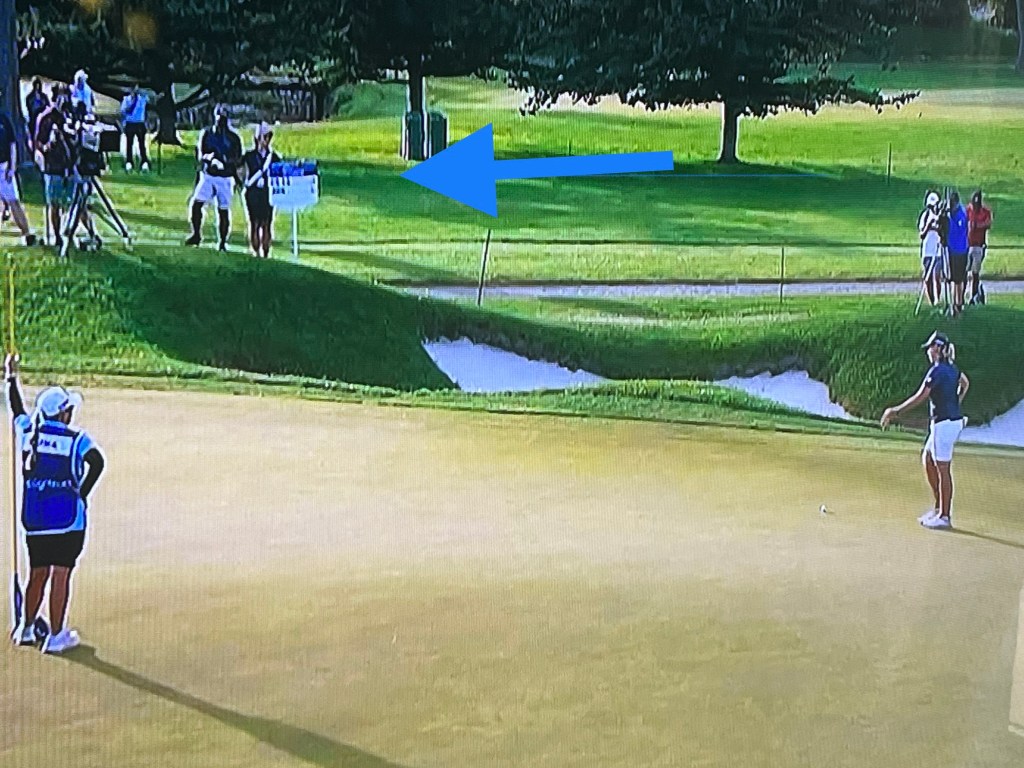
To my surprise after working the event I actually found a picture of Ashleigh Buhai putting with me in the background as her score bearer (I stood where I wouldn’t be in her putting site-line).

The LPGA’s Cognizant Founders’ Cup was an incredible experience. I was a standard bearer for 2 days, and 3 separate pairings. The Third Round: Ryan O’Toole & Gemma Dryburgh were both spectacular. For the Fourth (Final) Round Pairings I worked with: Yu-Sang Hou & Annie Park, then Ashleigh Buhai & Hae Ran Ryu, I had the opportunity to witness some of the world’s best golfers in action.

The event was held at The Upper Montclair Country Club, in Clifton, NJ. The weather was perfect, and the atmosphere was electric from start to finish. The tournament was played over four days, and the level of competition was intense. The golfers were all focused on winning the tournament, and it was clear that every shot mattered.

As a standard bearer, my job was to carry a sign displaying the players’ scores and walk with them around the golf course. It was an honor to be so close to the action, and I was amazed by the skill and precision of the golfers.

All are/were fantastic players, but Ashleigh Buhai and Hae Ran Ryu both finished in the top 4.  It was a privilege to be a standard bearer for all 6 players.  They were gracious and kind.  I was truly moved at how much time they all gave to the young ladies’ golfing “clinic” held right there on the grounds. 

The event production was well done.   Was it perfect?  – no, there were many pain points, but the attendees did not seem to notice. The organizers had put much effort into making sure that everything ran relatively smoothly, and it showed. The course was in great condition, and the facilities were top-notch. There were plenty of food and drink options available, and the staff were all friendly and helpful.

One of the highlights of the tournament was the Pro-Am event, which took place on the Wednesday before the tournament started. This gave amateur players the chance to play with the professionals and experience what it’s like to compete at the highest level. It was great to see so many people getting involved and enjoying the game of golf.

Another highlight was the closing ceremony, which of course took place on the final day of the tournament. The atmosphere was electric as the golfers made their way to the 18th hole, and the crowd cheered them on every step of the way.

In the end, it was Jin Young Ko who came out on top in a sudden death round with the amazing Minjee Lee. An impressive match-up to say the least.

Ashleigh Buhai finished in third place, and Hae Ran Ryu in fourth, both with strong performances throughout the tournament. Both “burned” many of the hole rims throughout the competition.  Those misses were so so close, it could break your heart.

Overall, the LPGA’s Cognizant Founders Cup was an amazing experience. It was a honor and a privilege to be so close to the action to the end.  I witnessed some of the world’s best golfers live in action. 

Thank you Ladies!

Top Live Broadcast Providers, Overview: CP Communications, NEP, Broadcast Solutions, Gearhouse Broadcast, & Gravity Media

There are Many Live Broadcast Event Companies out there, all with their own range of services.  Following is a short overview of some of them.  Feel Free to chime in with others…..

CP Communications is an audiovisual and live event production company that provides services for sports and entertainment events. They specialize in live event production, audio and video equipment rental, and staging and lighting design. The company offers a range of services, including:

1. Live event production – live event production services for sports, music, and entertainment events. This includes production planning, camera coverage, audio and video mixing, and on-site technical support.

2. Audio and video equipment rental -offers a range of audio and video equipment rental services, including cameras, microphones, speakers, and projectors. They also provide on-site technical support for equipment setup and operation.

3. Staging and lighting design – staging and lighting design services for live events, including custom stage design, lighting installation, and video projection mapping.

NEP Group is a leading provider of production services, engineering solutions, and media management for live sports and entertainment events worldwide. NEP Group provides a wide range of services, including:

1. Live event production – production services for sports, music, and entertainment events. This includes production planning, camera coverage, audio and video mixing, and on-site technical support.

2. Remote production – remote production services for sports events, allowing broadcasters to produce live events from a centralized location. This includes remote camera control, audio and video mixing, and on-site technical support.

3. Media management – media management services, including content storage, archiving, and distribution. This includes video editing, metadata tagging, and asset management.

4. Technical support – technical support services for audiovisual equipment and systems, including equipment rental, maintenance, and repair.

Broadcast Solutions is a global provider of production services and engineering solutions for sports, music, and entertainment events. The company offers a range of services, including live event production, remote production, and media management.

Gearhouse Broadcast is a global provider of production services and engineering solutions for sports, music, and entertainment events. The company offers a range of services, including live event production, remote production, and equipment rental.

Gravity Media is a global provider of production services and engineering solutions for sports, music, and entertainment events. The company offers a range of services, including live event production, remote production, and equipment rental. Gravity Media also provides specialized solutions for specific industries, such as esports and motorsports.

The differences between the above competitors include their range of services, geographic coverage, and industry specialization. It is recommended to evaluate the features, capabilities, and pricing of each provider before making a decision.

Short Tutorial: SMB

SMB stands for Server Message Block, which is a protocol for sharing files, printers, and other resources on a network. In Mac Finder, SMB is used to connect to Windows file servers or other network-attached storage devices that use the SMB protocol for sharing files.

When you connect to an SMB server using Mac Finder, you can access files and folders on the server just like you would on your local computer. You can browse the server’s file system, open files, copy files to or from the server, and perform other file management tasks. 

To connect to an SMB server using Mac Finder, you will need to know the server’s name or IP address, as well as a valid username and password with permissions to access the shared files or folders.

Practice this at least 3 times – get your clicks & Muscle Memory In!

👍 Like, Follow, and subscribe to this article blog – it’s free!

Turn Yourself Into a Resource (not a Commodity) that Companies Need!

Turn yourself into a resource that companies need!

1. Identify Your Unique Skill Set: First, you need to recognize and understand your unique skill set. Reflect on your strengths and weaknesses and consider how they might be valuable to a company.

– For instance, if you are interested in the broadcast industry, you may have skills such as live event production, video editing, scriptwriting, or on-air presenting. Identify which of these skills you excel at and enjoy doing the most.

2. Research the Market: Research the target market and identify the skills or resources that companies are looking for. This will help you tailor your skills and promote them in a way that meets company needs.

– Research the broadcast industry and identify the skills or resources that companies are looking for. For example, many broadcast companies seek individuals who are skilled in live production, video editing, and social media management.

3. Focus on Value Proposition: Craft a strong value proposition that highlights the benefits of your skills, knowledge, or experience. Explain how you can add value and solve problems for the company by using your skills.

– Craft a compelling value proposition that highlights the benefits of your skills. For instance, you could say something like: “I’m an experienced live event producer with a passion for creating engaging, high-quality content that connects with audiences. With my skills and experience, I can help your broadcasting company create engaging programming and reach a wider audience.”

4. Develop a Professional Brand: Build a professional brand that conveys your skills, professional approach, and your unique value proposition. Use social media, online portfolios, cover letters, and resumes to showcase your brand.

– Build a professional brand that conveys your skills and value proposition. Create an online portfolio that showcases your work, and use social media to share your expertise and connect with others in the broadcast industry.

5. Network: Build relationships and connect with people in your target market. Attend industry events, join professional organizations, and engage with companies and their employees through social media. Establishing relationships with people can help you learn about new opportunities and make you a valuable resource in the eyes of companies.

– Build relationships and connect with people in the broadcast industry. Attend industry events, join professional organizations, and engage with others in the industry through social media. This can help you learn about new opportunities and make valuable connections.

6. Demonstrate Credibility: Establish credibility by sharing your expertise through articles, presentations, or blogs. Share your knowledge, insights, and experiences related to your area of expertise, both online and offline. This will show companies that you are a credible expert and a valuable resource.

– Establish your credibility by sharing your expertise through articles, presentations, or blogs. For example, create a YouTube channel where you share live event production tips or write articles on the latest trends in video editing. This will show companies that you are knowledgeable and passionate about your craft.

7.  Be Consistent.  

You can set yourself apart in the broadcast industry, or any Industry really, and become a valuable resource that companies are eager to work with.

Quick Comparison of Broadcast Cellular Aggregators

Bonded cellular aggregators are devices that combine multiple cellular connections from different carriers into a single, more reliable and faster connection. This technology is commonly used in live video streaming, where a reliable and fast internet connection is crucial. Bonded cellular aggregators can also be used to improve internet connectivity in remote areas where traditional broadband connections are not available. The technology works by splitting the data stream into smaller packets and then sending those packets simultaneously over multiple cellular networks. The receiving device then combines the packets and reassembles them into a single data stream. This process helps to reduce latency and improve overall connection quality.

There are several companies that provide bonded cellular aggregators, including LiveU, TVU Networks, Mushroom Networks, Teradek, and Peplink. These companies offer a range of devices and solutions for different types of applications, from small portable units for on-the-go streaming to rack-mounted systems for studio production. Each company has its own unique features and capabilities, so it’s important to evaluate them based on your specific needs and requirements.

– LiveU is a leading provider of bonded cellular solutions for live video streaming/ broadcasting. Their products range from small backpack-sized units to larger rack-mounted systems. LiveU’s solutions are known for their reliability and high-quality video transmission. LiveU products are popular among broadcasters for their high reliability and ability to transmit high-quality live video from remote locations.

– TVU Networks is another popular provider of bonded cellular solutions for live video streaming. Their products include both portable and rack-mounted units, and they offer unique features like remote control and automation. TVU products are used by broadcasters to transmit live video from the field, and they offer features like remote control and automation to simplify the broadcasting workflow.

– Mushroom Networks provides a range of WAN aggregation solutions, including bonded cellular devices. Their products are designed to improve internet connectivity in remote areas and areas with poor infrastructure. Mushroom Networks provides bonded cellular solutions for broadcasting, with a focus on improving internet connectivity in remote areas. Their products are designed to help broadcasters transmit live video from areas with poor infrastructure or limited connectivity.

– Teradek is a provider of video encoding and transmission solutions, including bonded cellular devices. Teradek products range from small portable units to larger rack-mounted systems, and they offer features like wireless camera control and remote configuration. Teradek products are used by broadcasters to transmit high-quality live video from remote locations, and they offer features like wireless camera control and remote configuration.

– Peplink is a provider of SD-WAN and WAN aggregation solutions, including bonded cellular devices. Peplink products are designed for both business (broadcasting included)and consumer use and offer features like cloud-basedLO management and failover protection. Peplink provides bonded cellular solutions for broadcasting, with a focus on SD-WAN and WAN aggregation. Peplink products are designed to improve internet connectivity and network reliability for broadcasters, ensuring that live video broadcasts are transmitted smoothly and without interruption.

Each company has its strengths and weaknesses, and the best choice depends on the specific needs and requirements of the user.

Broadcasting Standards: Utilizing AI with SCTE-35, SCTE-104

SCTE markers are metadata tags that are inserted into a video stream to signal specific events or actions, such as ad insertion points. DAI stands for Dynamic Ad Insertion, which is a technology that enables the insertion of targeted ads into live or on-demand video streams. Users can now elect to use or interact with AI bots like GPT-3.5/GPT-4 to even further automate these processes.


There are several SCTE standards that define SCTE markers for different use cases. For example, SCTE-35 defines markers for digital program insertion (DPI) and SCTE-104 defines markers for ad insertion. The specific SCTE markers used for DAI will depend on the implementation.

AI can help the process of dynamic ad insertion by analyzing data to identify patterns and make predictions about viewer behavior. Here are a few ways AI can be used:

1. Predicting viewer preferences: AI can analyze data about viewer behavior, such as which ads they tend to skip, and use that information to predict which ads will be most effective for a particular viewer.

2. Optimizing ad placement: AI can analyze data about viewer behavior to determine the optimal placement of ads within a video stream, such as which ad formats are most effective at different points in the video.

3. Targeting ads to specific audiences: AI can analyze data about viewer demographics and behavior to identify specific audience segments and deliver targeted ads to those segments.

4. Creating personalized ads: AI can analyze data about individual viewers to create personalized ads that are more likely to be effective.

Overall, AI can help make the process of dynamic ad insertion more efficient and effective by using data to make smarter decisions about ad placement and targeting.

Quick Comparison Guide: LTN, The Switch, AWS Elemental , Haivision, & Grabyo

Ltn and The Switch are two of the leading providers of live video transmission and broadcasting solutions, but there are also other competitors in this market. Here is a brief comparison of Ltn, The Switch, and other competitors in this space:

1. Ltn – Ltn offers a range of cloud-based video transport and managed network solutions for broadcast and live events. Ltn’s solutions support up to 4K resolution, and offer features such as low-latency transmission, bonding of multiple cellular networks, and support for a range of video formats. Ltn’s pricing model is subscription-based, with customized pricing plans based on the specific needs of the customer. Ltn also offers 24/7 support and a global network of data centers.

2. The Switch – The Switch offers a range of video transport and production solutions for broadcast and live events, including fiber-optic networks, satellite trucks, and remote production services. The Switch’s solutions support up to 4K resolution, and offer features such as low-latency transmission, bonding of multiple cellular networks, and support for a range of video formats. The Switch’s pricing model is based on usage and location, with customized pricing plans based on the specific needs of the customer. The Switch also offers 24/7 support and a global network of data centers.

3. Haivision offers a range of video transport and production solutions for broadcast and live events, including cloud-based video streaming, low-latency encoding, and remote production services.

4. AWS Elemental offers a range of cloud-based video processing and delivery solutions for broadcast and live events, including live streaming, video encoding, and content delivery.

5. Grabyo offers a cloud-based platform for live video production and distribution, with features such as live clipping, real-time graphics, and social media integration.

The choice between these companies will depend on the specific needs and requirements of the organization, as well as factors such as pricing, support, and integration with other systems. It is recommended to evaluate the features, capabilities, and pricing of each provider before making a decision.

Job Hunting Tips: Say What??

You Need a Major career move, promotion, complete overhaul, change to something new altogether. Now what? Here are some steps to follow:

1. Target companies you’d like to work for. Research them, not only the bottom line, but their products (use cases), company culture, and the people who work there, especially people on the hiring team and HR. LinkedIn is a great resource for this.

2. Follow the companies AND the people at the companies, start commenting on their posts. These comments should add value to what was already said, and also tag the person who posted the information, state or reword what they’ve stated and add to it. Keep going, it’ll take time to establish a connection with people. Don’t ask for any recommendations or help, add validation to what was posted.

3. Find a unique issue that you can solve for the company. Then, begin to formulate a pitch deck for your solution. Find out what you can improve. Make your pitch about helping them, not about yourself. Find the opportunity to present your solution.

Make sure you find out what the Company’s goals and current/future initiatives are. Be the Solution /Bridge.

With your pitch deck show the value you’re adding, without making it about yourself. Add in industry data to validate your information.

5. Outline your ideas, THEN your background.

6. Send your contacts (after establishing them- see #2 above) an email asking for a chat about your idea. Have your pitch deck ready. Make sure it’s in a logical order, and succinct. Also make sure you have prepared some small talk based on what you’ve gleaned from your contacts posts and information pages. What groups do they and you belong to? Have that ready to go!

After the chat, and your contact is onboard with you – THEN the ask can come. Ask for the referral, now you have an in-house cheerleader.

What if you’ve worked with someone and lost contact over the years?

Ok, you’ve lost touch with someone. You met / were friends with someone while working and now Need to contact them regarding a job opportunity. What do you start with? “Hello” ?

Don’t over complicate it.

I’m trying to reach certain people I started out my career with, and worked alongside with for years, but that was 33 years ago too.

I did start with “Hello, it’s been a long time.” We picked up conversation like we hadn’t missed a beat, which I find a lot of in broadcasting. I loved working with and for just about every employer in my career.

Luckily, within the first conversation I was able to bring up the job opportunity, and “my person” said they’d be happy to help. You’ll find most people will, as they have or will need a similar recommendation themselves in the future.

For more information please reach out! 👍 Comment / Follow Me – it’s free!

Quick Overview Sports Graphics

There are several broadcasting sports live-action tracking devices that are used to track the performance of athletes during live sporting events. Here are some of the most popular broadcasting sports live-action tracking devices and their graphics:

1. Hawk-Eye: Hawk-Eye is a widely used tracking device in sports such as baseball, tennis, cricket, and football. It uses a combination of cameras and algorithms to track the trajectory of the ball and player movement. The graphics in Hawk-Eye are highly advanced, providing viewers with various angles and replays of the action.

2. SportVU: SportVU is a tracking device that is widely used in basketball. It uses six cameras mounted on the rafters of the stadium to track the movement of players and the ball. The graphics in SportVU are highly detailed, providing viewers with information such as player speed, distance covered, and shot trajectories.

3. Prozone: Prozone is a tracking device that is widely used in football. It uses a combination of cameras and software to track the movement of players on the pitch. The graphics in Prozone are highly detailed, providing viewers with information such as player heat maps, passing networks, and goal-scoring opportunities.

4. Catapult: Catapult is a tracking device that is widely used in various sports such as football, rugby, and basketball. It uses wearable sensors that are attached to players to track their movement and performance. The graphics in Catapult are highly customizable, allowing coaches and analysts to track specific performance metrics.

5. Golf: Golf has been using tracking devices for several years now, and one of the most popular devices is ShotLink. ShotLink uses lasers and cameras to track the movement of the ball and players during a golf tournament. The graphics in ShotLink are highly detailed, providing viewers with information such as shot distance, ball speed, and spin rate.

• TrackMan technology is another popular tracking device used in football and golf. It uses radar technology to track the movement of the ball, providing detailed data on ball flight and accuracy. 

For Golf TrackMan can also provide information on clubhead speed, ball spin rate, launch angle, and more. Additionally, it can provide a 3D representation of the ball flight, allowing players and coaches to analyze and optimize their shots.

The graphics in TrackMan are highly detailed, providing golfers with information such as shot distance, ball speed, and spin rate. This information helps golfers to better understand their shots and make adjustments to their swing and club selection.

Overall, TrackMan technology has become an essential tool for golfers, providing them with detailed data and graphics to help improve their game.

6. Baseball: Baseball uses a tracking device called Statcast, which uses a combination of cameras and radar to track the movement of the ball and players during a game. The graphics in Statcast are highly detailed, providing viewers with information such as pitch speed, launch angle, and exit velocity. Additionally, Statcast can also track the defensive positioning of players on the field.

Football has multiple tracking devices that are used to provide detailed data and graphics during live events. Here are some popular football tracking devices:

1. STATSports: STATSports is a wearable tracking device that is used to track the movement and performance of football players. It uses GPS and accelerometers to track player movement, providing data on distance covered, speed, and heart rate. The graphics in STATSports are highly detailed, providing coaches and analysts with information on player performance and fatigue.

2. Zebra Technologies: Zebra Technologies is a tracking device that is used to track player movement and performance during a football game. It uses RFID tags that are placed inside player shoulder pads to track their movements on the field. The graphics in Zebra Technologies are highly detailed, providing coaches and analysts with information on player speed, distance covered, and more.

3. ChyronHego: ChyronHego is a tracking device that uses cameras and software to track player movement and performance during a football game. The graphics in ChyronHego are highly customizable, allowing coaches and analysts to track specific performance metrics such as passing accuracy, tackles, and interceptions.

Track and field also use tracking devices to provide viewers with detailed data and graphics during live events. One of the most popular tracking devices used in track and field is called Omega Timing.

1. Omega Timing uses a combination of cameras, sensors, and timing technology to track the movement of athletes during a race. The graphics in Omega Timing are highly detailed, providing viewers with information such as race times, split times, and finishing positions. Additionally, Omega Timing can also track the performance of athletes in field events such as the long jump and high jump.

Overall, Omega Timing has become an essential tool for track and field events, providing viewers with detailed data and graphics to enhance their viewing experience.

Broadcasters utilize various brands, models, and features for their sports broadcasting graphics and lower-third generators:

1. ChyronHego:
– LyricX: Provides real-time 3D graphics, video clips, and animations, as well as advanced data visualization tools.
– Prime: Offers a streamlined workflow for creating and delivering graphics, as well as a variety of templates and design tools.
– CAMIO: Allows for centralized management of graphics and content, as well as integration with third-party data sources.

2. Ross Video:
– XPression: Provides real-time 3D graphics and animation, as well as support for virtual sets and augmented reality.
– Inception: Offers a web-based platform for creating and delivering graphics, as well as social media integration and playlist management.
– DashBoard: Allows for remote control and monitoring of graphics and production equipment, as well as customizable user interfaces.

3. Vizrt:
– Viz Trio: Provides real-time 2D and 3D graphics, video clips, and animations, as well as support for virtual sets and augmented reality.
– Viz One: Offers a centralized media asset management system, as well as tools for creating and delivering graphics and video content.
– Vizrt Social TV: Allows for integration with social media platforms and real-time data visualization.

4. Avid:
– Maestro | Designer: Provides real-time 3D graphics and animation, as well as support for virtual sets and augmented reality.
– Maestro | Live: Offers a web-based platform for creating and delivering graphics, as well as support for social media integration and data visualization.
– Maestro | News: Allows for centralized management of graphics and content, as well as integration with third-party data sources.

Overall, these graphics and lower-third generators are chosen for their advanced capabilities, ease of use, and integration with other production equipment and software. Each of these solutions has its own unique features and advantages, allowing broadcasters to create high-quality graphics and lower-thirds that enhance the viewer experience during a live sports broadcast.